Image Generated but Download Failed: Recover the Existing Result
Separate image submission, task polling, and file downloads. Resume by task ID, save URL or Base64 results, and validate files before retrying generation.
The image API reports success, but the file never reaches disk. Or the client times out, leaving you unsure whether generation happened. Preserve the response and task records before deciding what to send next.
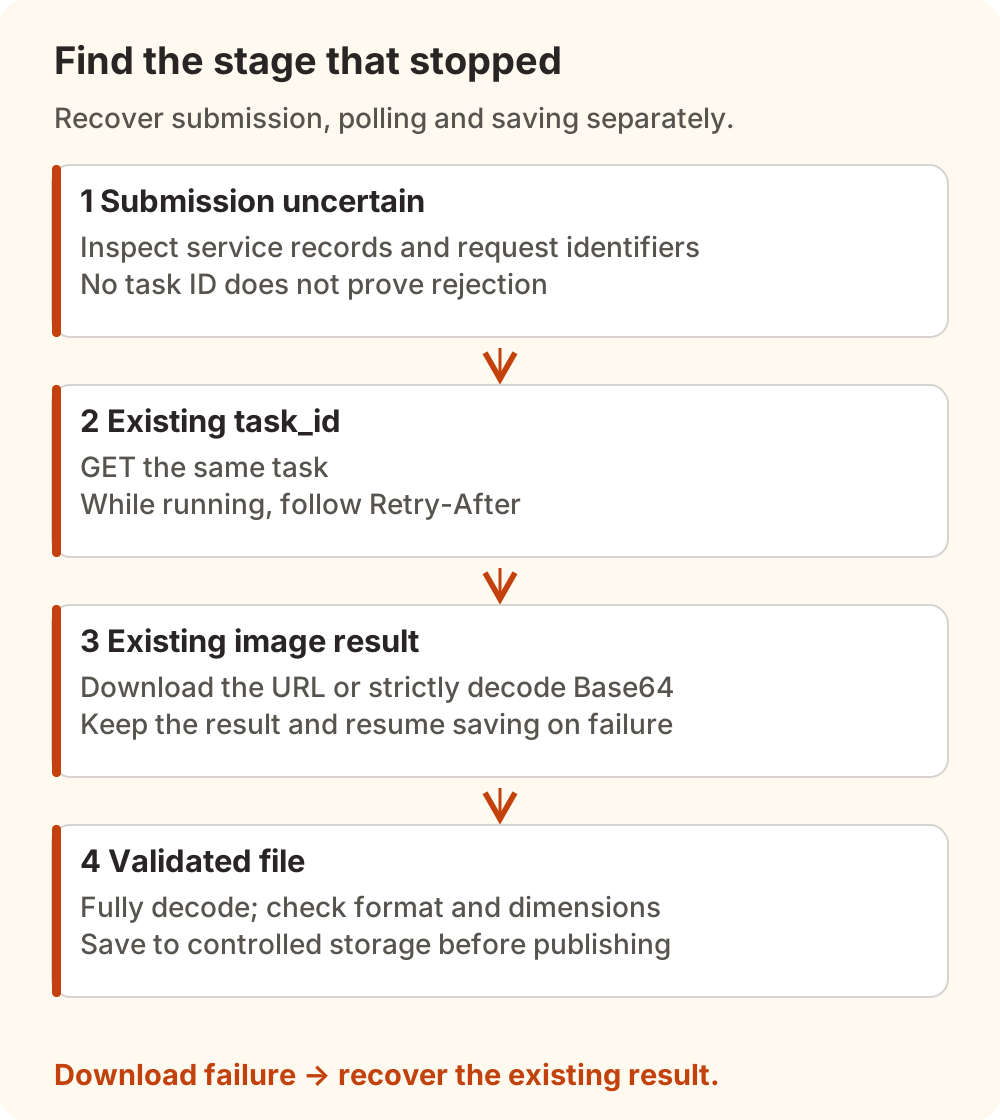
Generating an image, polling a task, and downloading a result are separate operations. If a result exists, resume saving it. If you have a task_id, query that task. If submission is uncertain, investigate before sending the prompt again.
This guide uses official sources and Nbility's image interface checked on November 9, 2026. It includes a Base64-saving example verified offline. The asynchronous task routes below belong to Nbility; OpenAI's own response rules are identified separately.
Find the Stage That Stopped
| What you have | What it establishes | Next action |
|---|---|---|
| Submission timed out with no response | Acceptance is unknown | Preserve time and request identifiers; inspect service records |
| A task ID with a waiting or running status | A task exists without a final result | Query the same task with GET |
| Successful result containing a URL or Base64 | An image result is available | Download or decode, validate, then save |
| A file that will not open | The download may be incomplete, mislabeled, or not an image | Inspect the response, type, and full decoding |
Even an “expired” message needs context. Cherry Studio issue #18460 includes an original Chinese report from Windows version 2.0.3: images sent through a WeChat clawbot could not be viewed on Android. There are no diagnostic logs, and the only follow-up is an inactivity bot. It motivates checking delivery and the receiving client; it cannot establish that generation failed or that a particular image URL expired.
If no image result was produced because parameters were rejected or a safety check failed, start with image-generation troubleshooting. This article addresses recovery after a task or result exists.
Identify the Response Shape Before Parsing It
| Response path | Fields to inspect | How to proceed |
|---|---|---|
| Synchronous image with URL | data[i].url | Download that file |
| Synchronous image with Base64 | data[i].b64_json | Strictly decode and validate |
| Nbility asynchronous submission | data.task_id | Save the identifier and poll |
| Completed Nbility task | data.status, data.image_urls or data.result_url | Download the existing result |
Here, i identifies each returned image. Handle every result separately; saving the first image does not complete a batch.
The official OpenAI Images reference says GPT Image models return Base64 and do not support the legacy response_format parameter. When calling OpenAI directly, follow that model's official interface. Nbility's image API provides its own response normalization with documented url and b64_json choices. A gateway's response options do not establish the behavior of the direct OpenAI endpoint.
A recent example is Open WebUI issue #33874, concerning a development branch. Leaving the model field empty selected a GPT Image model, while a request-building condition still checked the original setting and included an unsupported parameter. PR #33875 merged on November 8. In the v0.13.3 tag checked for this article, both conditions use the effective model. That fixes a request-construction path; it does not establish that every image-download problem is resolved.
Have a Task ID? Poll the Same Task
Tasks created using Nbility's X-New-Api-Async-Task: true header can be queried with the existing authentication configuration. The following GET does not start another generation. Replace the placeholder with your existing task ID and inject the key through your private environment configuration:
umask 077
export IMAGE_TASK_ID="task_YOUR_EXISTING_TASK_ID"
curl --fail-with-body --silent --show-error   --dump-header task-headers.txt   --output task-result.json   -H "Authorization: Bearer $NBILITY_API_KEY"   "https://api.nbility.ai/v1/images/tasks/$IMAGE_TASK_ID"
Read data.status in task-result.json:
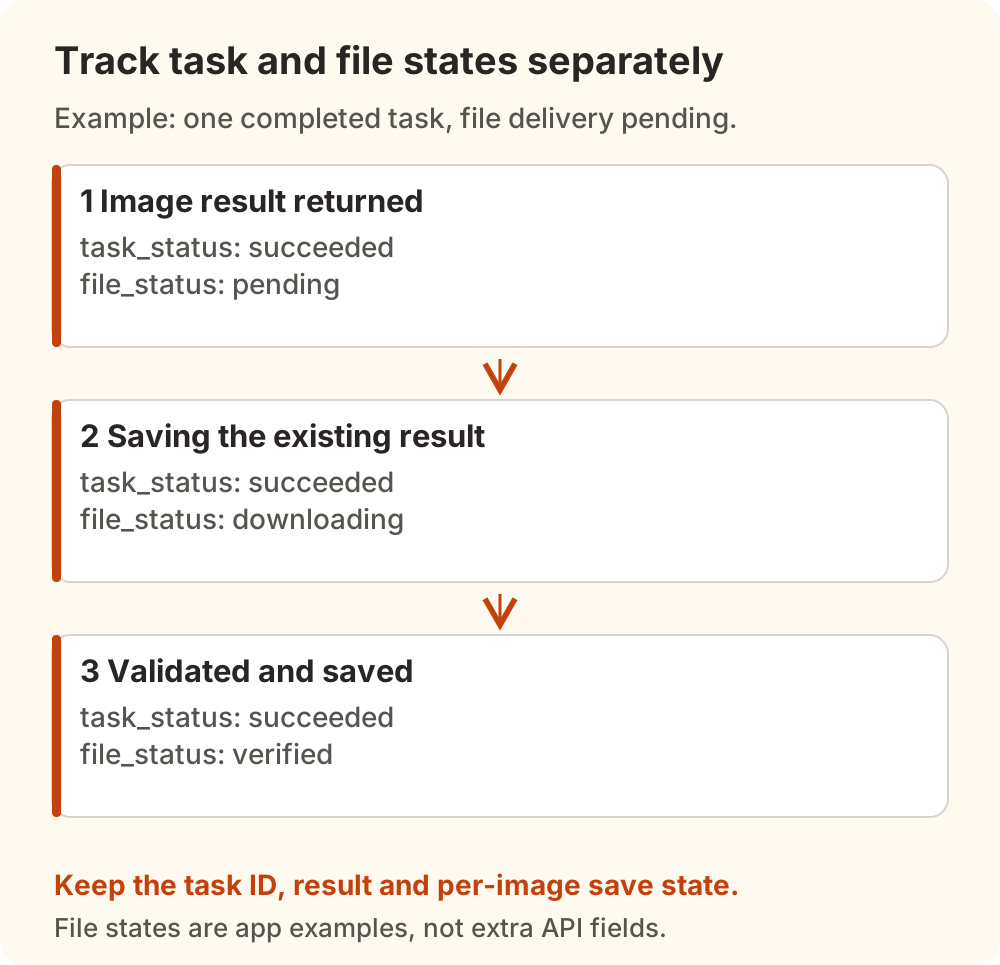
submitted,queued, orin_progress: wait. The current Nbility implementation returnsRetry-After: 3for unfinished tasks. Schedule the next poll accordingly and give your polling loop a stopping condition.succeeded: inspect the image result and save it. This status does not establish that your disk or object storage holds the file.failed: retainfail_reasonand investigate. Another generation is a new operation requiring a deliberate decision.
Keep state files, responses, and result links in a private directory. Retain the task ID, submission time, model, request-parameter summary, task status, and per-image save status. On restart, read that state before choosing the next action. A task ID is also insufficient as a permanent archive: this article has not verified Nbility's task or result retention policy and makes no permanent-availability claim.
If submission timed out without returning an ID, retain the time, model, and available request identifiers. Inspect available usage logs, then ask support to investigate if necessary. An absent log entry alone cannot establish that upstream rejected the request. This article has not verified an idempotency key that makes replaying generation POSTs safe; a matching prompt is insufficient grounds for automatic resubmission.
Have a URL? Resume the Download
Put the complete result URL you already received in the private IMAGE_URL environment variable. Download into a temporary file in a fresh directory:
umask 077
mkdir -p image-recovery
curl --fail --silent --show-error --location   --connect-timeout 15 --max-time 180   --output image-recovery/image.part   "$IMAGE_URL"
This request deliberately carries no model API key. The result may live on a separate CDN or storage service. Do not copy the API's Authorization header to that host. A signed result URL itself should also remain private.
Handle failures at the download stage:
- Timeout or transient network failure: retain the original task and result. Retry the download GET a bounded number of times. Keep incomplete
.partfiles out of published assets. - 403 or 404: check the complete URL, expiry conditions, and resource availability. See whether the original task still yields a usable result. Neither status proves expiry, and polling is not guaranteed to refresh a link.
- Works in a browser but not in the program: compare the execution machine, redirects, and network path. A server-side job does not inherit your browser login.
- HTTP 200 but unreadable file: inspect Content-Type and the actual bytes; you may have saved an error page. Renaming it to
.pngcannot make it an image.
We did not establish a universal lifetime for Nbility result URLs, so there is no fixed “download within one hour” promise here. Copy long-lived assets to storage you control and separately confirm its permissions and retention.
Save Base64 Only After Validation
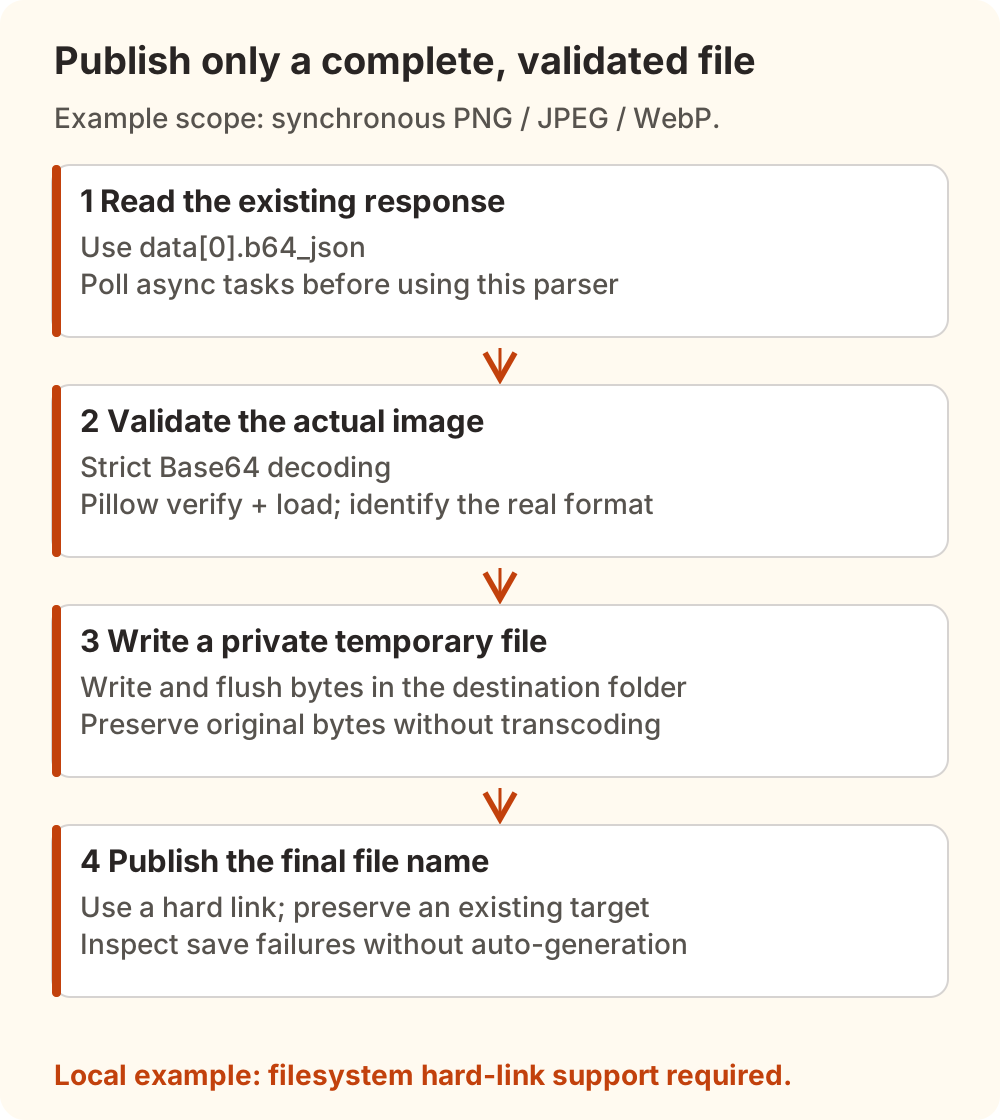
The following script handles the first image in an already saved synchronous Images response, limited to PNG, JPEG, and WebP. It neither submits generation requests nor parses asynchronous task responses. Extend it per result for batches and track each completed file. GIF, SVG, and other formats need suitable validation beyond this example.
Install Pillow in your local Python 3 environment:
python3 -m pip install Pillow
Save this as save-b64.py:
import base64
import io
import json
import os
import sys
import tempfile
from pathlib import Path

from PIL import Image

response = json.loads(Path(sys.argv[1]).read_text(encoding="utf-8"))
raw = base64.b64decode(response["data"][0]["b64_json"], validate=True)
with Image.open(io.BytesIO(raw)) as image:
    suffix = {"PNG": ".png", "JPEG": ".jpg", "WEBP": ".webp"}[image.format]
    image.verify()
with Image.open(io.BytesIO(raw)) as image:
    image.load()

folder = Path(sys.argv[2])
folder.mkdir(parents=True, exist_ok=True)
destination = folder / ("image" + suffix)
with tempfile.NamedTemporaryFile(dir=folder, delete=False) as temporary:
    temporary.write(raw)
    temporary.flush()
    os.fsync(temporary.fileno())
    temporary_path = Path(temporary.name)
try:
    os.link(temporary_path, destination)
finally:
    temporary_path.unlink()
print(destination)
Keep the existing response in a private result.json, then run:
python3 save-b64.py result.json image-recovery
The script strictly decodes Base64, verifies and fully decodes the image with Pillow, and chooses an extension from the actual format. It writes a private temporary file in the destination directory, then publishes the final name with a hard link. An existing destination causes failure rather than replacement. This requires a filesystem with hard-link support, such as an ordinary local disk; it is not an object-storage upload example.
We checked it using locally created PNG, JPEG, and WebP fixtures, invalid Base64, corrupt image bytes, and an existing destination. These checks made no paid model calls and establish no measured amount of avoided charges.
When to Generate Again
First establish that the previous result cannot be recovered, or that the requirement calls for a new image. The same prompt does not identify the same task, and a service need not deduplicate repeated generation requests.
Before publishing, confirm that the file fully opens, its extension matches its format, its dimensions suit the destination, and the uploaded copy is readable. Update the article or message URL afterward. Preserve the original bytes when fidelity matters; resizing, compression, and cropping should be separate, intentional steps.
For charges through Nbility, follow account and billing guidance to inspect actual requests and settlement. A client-side download failure alone does not determine whether a charge is due. The T3 Code usage reconciliation guide also explains how client records differ from service records. For the initial integration, start with the image API introduction.


