T3 Code Usage vs Your Bill: Check Scope and Cache Pricing
Separate T3 Code API-equivalent estimates, subscription limits, and actual charges. Audit Unpriced models, cache rates, and multi-environment history with a reproducible example.
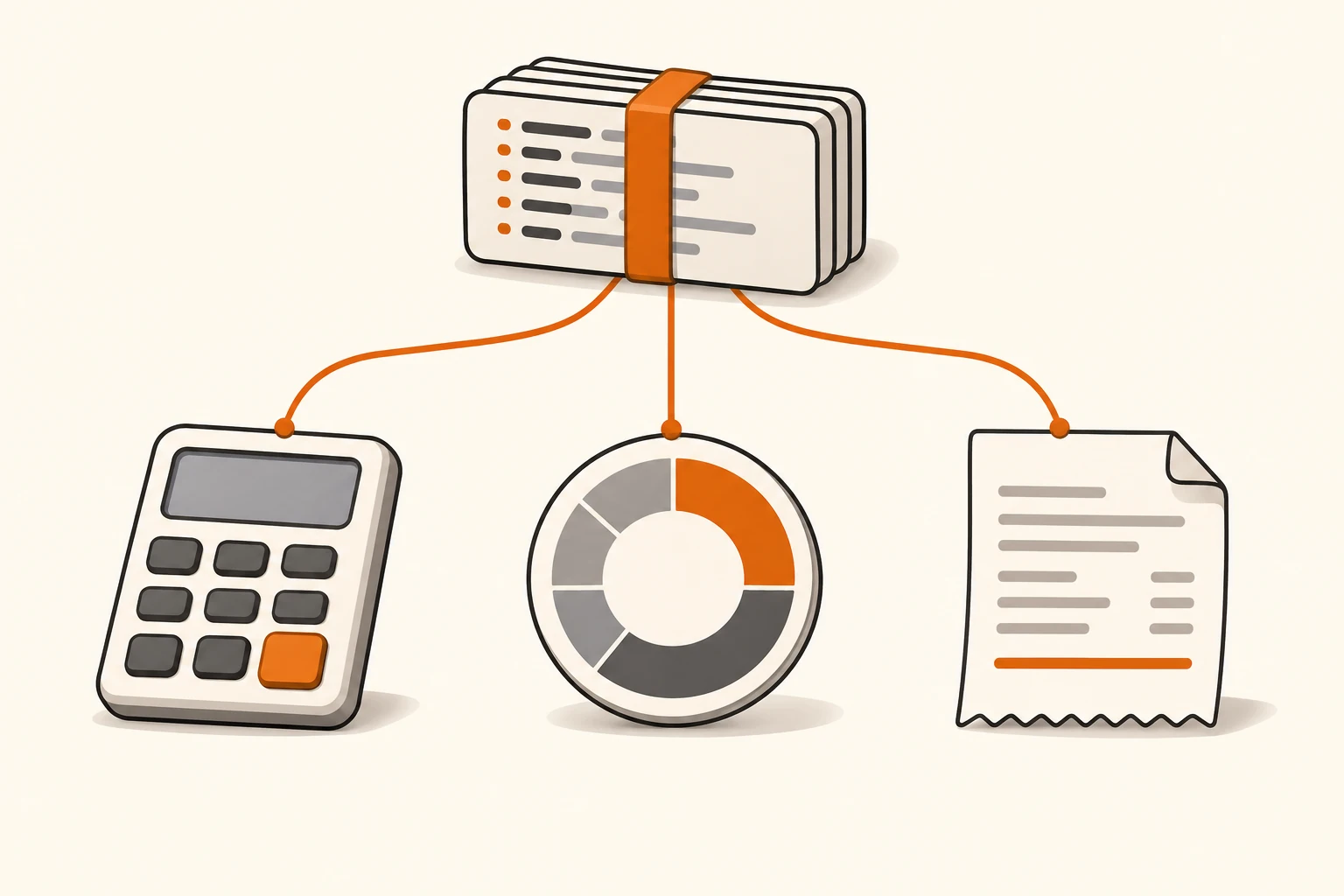
T3 Code shows tens of dollars in Usage, but your subscription has no matching charge. Another model completed a task yet appears as Unpriced. Before treating either as a billing error, check what each number represents.
Usage estimates API-equivalent cost. Limits reports subscription allowance. Your provider's billing records establish actual charges. Reconcile the time range, environments, accounts, and models before comparing prices or looking for missing calls.
This guide uses the T3 Code v0.1.7 stable release, its documentation, and its pricing implementation, checked on November 9, 2026. The latest stable release still resolved to that version. The calculation below is reproducible; it is not a measurement of a paid session or a provider invoice.
Three Numbers, Three Different Sources
The official Usage documentation calls the displayed amount estimated API-equivalent cost and explicitly distinguishes it from your subscription bill. It depends on available usage records and the prices applied to them.
| Number | What it tells you | What to check next |
|---|---|---|
| Usage cost estimate | The estimated cost of the history T3 could read | Included records, pricing source, unpriced models |
| Remaining allowance in Usage → Limits | What connected subscription accounts report for their usage windows | Account identity, reading time, provider allowance page |
| Provider usage logs and billing | How requests through that service were recorded and settled | Request details, plan terms, billing groups, units |
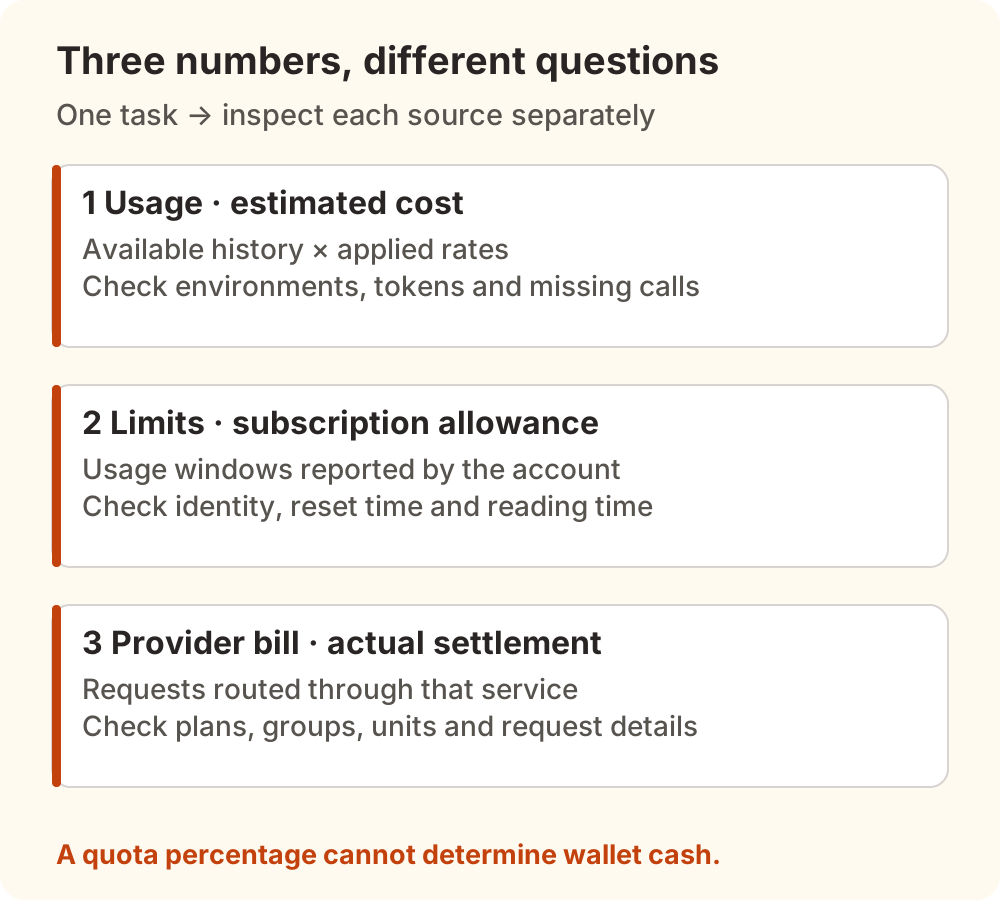
An API-equivalent total above a monthly subscription price does not, by itself, establish savings. Such a comparison needs matching tasks, models, speed settings, complete calls, and plan conditions. A remaining-allowance percentage is also insufficient to calculate a wallet balance.
A Chinese V2EX discussion about coding-agent usage illustrates the confusion: participants ask where to find token totals and whether gateway statistics agree with provider dashboards. Their configurations mix paid and free usage. Those self-reports motivate a reconciliation method; they cannot establish an average daily development cost.
Missing Cost? Check Which History Was Read
Open Usage on web or desktop and inspect the environment dropdown. In v0.1.7, all environments are selected by default. Results arrive as servers respond, so some totals may still be updating. Start with one environment, then add the others you intend to compare.
Check the following scope before changing a price:
- Time range: match the interval on both sides, including time zones and midnight boundaries.
- Accounts and history directories: Usage includes configured accounts' history, including disabled accounts. Accounts sharing a history directory count once. Disabling a connection does not remove its historical usage.
- Model filters: a server's
usageModelFiltercan exclude models from totals. - Available records: the documentation lists text-generation cases that do not enter totals because the harness saves no session history, including certain title or commit-message generation calls. A task's displayed total need not cover every related call.
Refresh after these checks to rescan history and update model pricing. If tokens appear without cost, investigate prices. If the call itself is missing, investigate its record source. A custom price cannot restore a call the reader never found.
If the thread never started, first inspect T3 Code workspace preparation, then reconcile actual calls. A loading state alone cannot establish whether model charges occurred.
For a recent, narrower example, issue #31298 reports an Antigravity child task with a transcript but no separate conversation database, leaving it outside the reader's candidates. It concerns a nightly build, explicitly credits AI agents for the investigation and posting, and remained open with no comments when checked. We did not reproduce it, and it does not establish that stable releases omit every child task.
For parallel work, use the T3 Code workspace checklist to list tasks and environments first. Separate thread titles do not establish separate billing accounts or endpoints.
Unpriced Means the Estimate Is Unresolved
Keep the exact model ID shown in Usage, then check the service actually handling that model and its applicable rates. An Unpriced label does not establish that the call was free.
In issue #30671, the reporter describes unpriced models with T3 Code 0.1.6 on Windows and an OpenCode Go subscription. A later comment adds observations from a nightly build and warns that leaving out cache-read pricing can inflate a manual estimate. That comment explicitly identifies AI-assisted analysis. Its amounts and diagnosis are not our measurements.
At the verification date, related PR #30683 was still open and unmerged. PR #30681 was closed without merging. Neither a proposed patch nor a Closed badge establishes a shipped stable fix.
The official documentation provides a way to add an estimate:
- On web or desktop, open Usage → environment dropdown → Model prices. Alternatively, select an unpriced model under Breakdown, then choose Set price.
- Enter the exact ID displayed by Usage. Input and output rates are USD per million tokens.
- Check cache-read and cache-write prices too. Use
0only for a verified free category. A blank field has a defined fallback, so verify an unknown rate before proceeding. - Review Apply to, then Save changes. If an offline environment reports Not saved, reconnect it and choose Retry failed saves.
These settings change T3's estimates. They do not change provider or Nbility charges. Saved prices replace automatic pricing for all history in the destination environment and are shared with connected clients. Earlier dates can therefore change after an override.
Leave Map to alone when your goal is simply to price a model. Mapping moves its tokens and cost under the target model and uses the target's price. The original model disappears as a separate row, complicating a before-and-after comparison.
A Blank Cache Rate Can Explain the Difference
Both the v0.1.7 documentation and createOverrideRateTable implementation specify that blank cache-read and cache-write rates fall back to the input rate. Blank does not mean an automatically discovered cache discount or a free category.
Consider this teaching example at standard speed. The ID example-model and all rates are hypothetical; they do not describe a commercial model or an actual bill.
| Category | Assumed tokens | Assumed USD / million tokens | Estimated amount |
|---|---|---|---|
| Uncached input | 1,000,000 | 2.00 | $2.00 |
| Cache read | 9,000,000 | 0.20 | $1.80 |
| Cache write | 0 | 2.00 | $0.00 |
| Output | 100,000 | 8.00 | $0.80 |
| Total | — | — | $4.60 |
Enter only input 2 and output 8, leaving cache read blank, and the same nine million cache-read tokens cost an estimated $18.00. The total becomes $20.80, a $16.20 difference without any change in tokens.
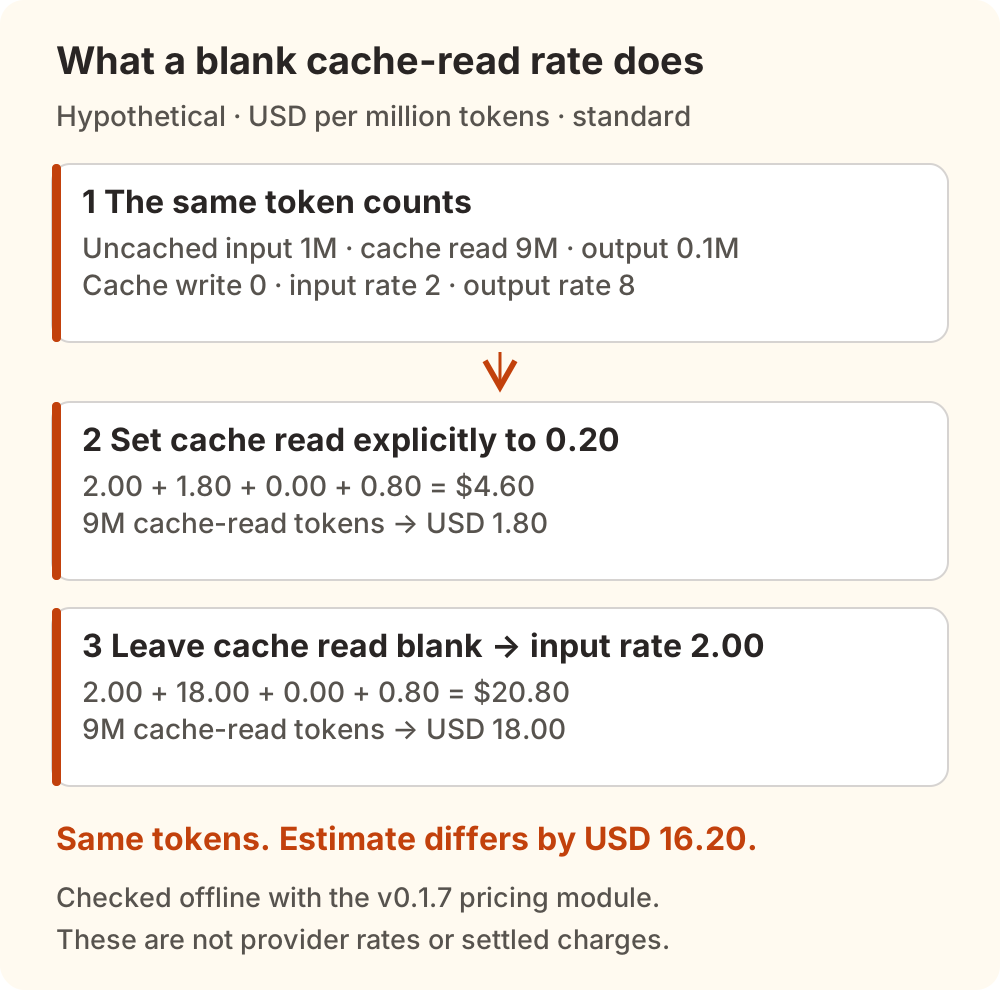
We ran the original stable-release pricing module offline to verify both totals and the precedence of an override over a recorded provider cost. This checks estimation behavior only. It sent no model requests and verified no provider settlement.
The calculation adds uncached input, cache reads, cache writes, and output. Do not add cache tokens again to an input total that already includes them. Check each service's field definitions and rules separately. For the underlying mechanism, see prompt caching and cost.
Missing Limits? Check the Actual Account
Usage → Limits displays reported subscription windows and may pool several accounts. The same account across environments counts once. Select an individual environment and inspect account details, sign-in location, window, and reading time before comparing with the provider page.
The official documentation warns that API-key accounts may not report subscription limits. A missing Limits value therefore establishes neither a zero API balance nor unrestricted usage.
Recent issue #30310 discusses failed Claude subscription-limit probes. A November 7 follow-up still concerns a nightly build. At the verification date, related PR #30999 was closed unmerged and PR #31135 remained open. The replies describe different environments and observations. They do not support one universal fix, or a recommendation to bypass organization-managed settings just to restore a display.
To check whether an account has allowance left, consult its actual account page. To check charges, inspect requests and billing. Missing allowance data and incorrect charges require separate investigations.
Reconcile Nbility Only for Requests Routed Through It
T3 Code manages multiple connections. A harness might use a subscription while another tool uses its own API key. Nbility records only requests actually sent through its service.
Use connection basics to verify the active tool's endpoint, protocol, token, and model. Choose a short, recognizable task and record its start and end times, environment, non-secret account identifier, and model ID. Wait for related requests to finish before comparing. Keep API keys out of notes and screenshots.
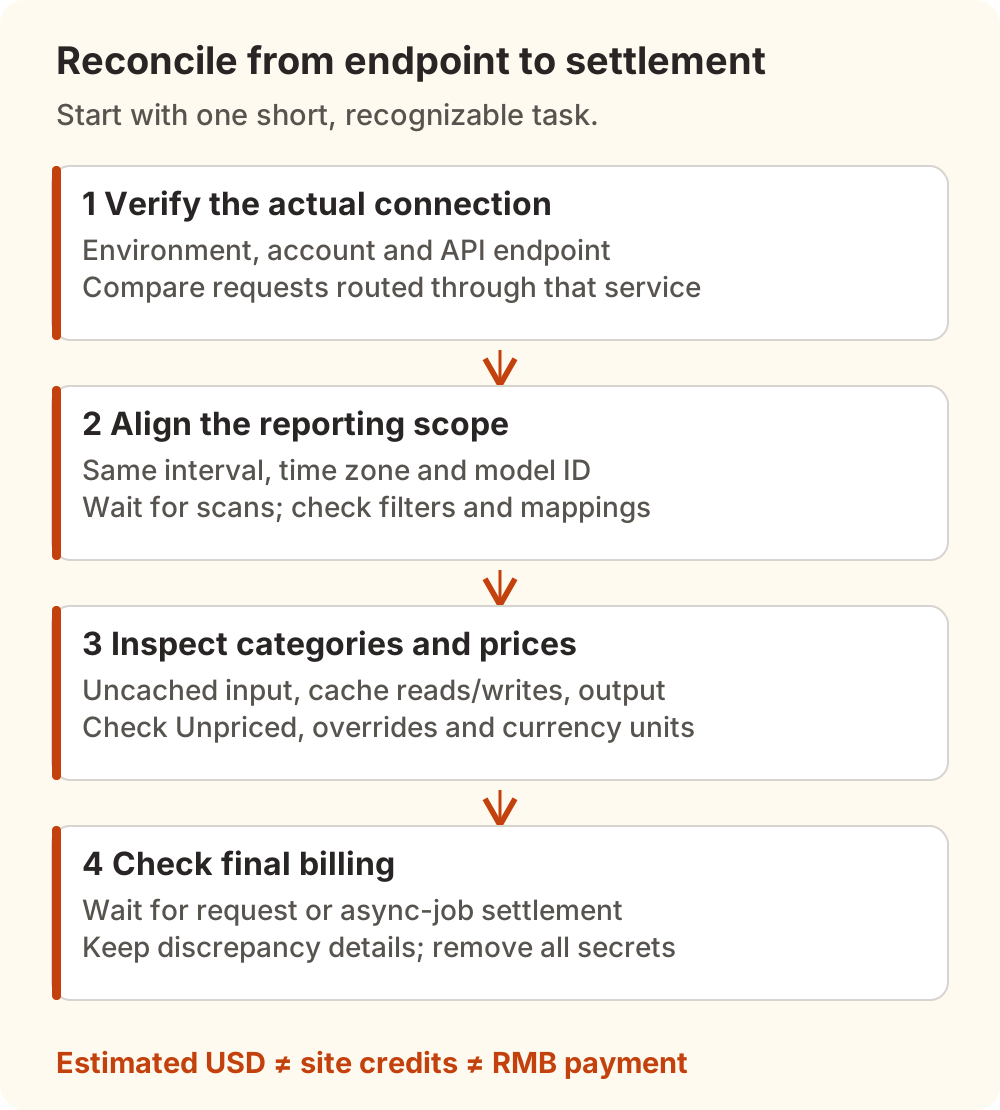
Work through the records in this order:
- In T3 Usage, select the intended environment, interval, and model. Record token categories, Unpriced status, price overrides, and any Map to setting.
- In Nbility usage logs, find the same interval and inspect actual model, group, status, and available request identifiers. An agent task can contain multiple calls; include more than its final answer.
- Follow account and billing guidance to check billing units, group conditions, and final settlement. Wait for asynchronous jobs to finish, then compare the same interval in billing.
- If a discrepancy remains, retain times, models, request IDs, token categories, and redacted pricing settings. A screenshot of two totals rarely distinguishes missing history from different rates or settlement.
Watch the units: T3 custom model prices use USD per million tokens; Nbility uses $ as an internal credit symbol. Nbility's billing documentation distinguishes upstream USD rates, site credits, and RMB payments. A matching symbol is insufficient to subtract one amount from the other.
Start with one short task before expanding to a day or week. For why an agent task can contain many model requests, continue with the agent token-cost breakdown. For actual charges, use the service's request details and billing records.