n8n Tools Succeed but the Agent Sees Empty Results: Check executionOrder
Trace empty Agent observations back to the matching tool run, inspect legacy execution order, and test v1 in a copy before repeating actions or changing production.

A tool's execution record says it succeeded and contains data, yet the n8n AI Agent answers that the tool returned nothing. Asking it to try again can repeat an action that already happened.
Check the matching tool call and its execution order, particularly settings.executionOrder in older workflows. A recent report describes the Agent continuing before its tool under v0; a copy using v1 received the result. That is a useful diagnostic lead with a specific scope, rather than an explanation for every empty observation.
Sources were checked on November 9, 2026, when GitHub's latest stable release was n8n 2.46.6. We inspected relevant code from that tag and ran isolated functions. We did not start a full n8n instance, call a live model, or reproduce a production workflow. If you are configuring the model connection for the first time, start with the n8n and Nbility setup guide, then use this guide to check the tool round trip.
Identify which result is empty
The AI Agent's Return Intermediate Steps option includes intermediate steps in its final output. See the official Tools Agent documentation. Save only the data needed for a controlled test: intermediate steps can contain tool arguments and business information.
Distinguish these cases:
| Observation | First check |
|---|---|
| A normal model reply has no text | Whether it is calling a tool or your parser reads the wrong field; see the empty-response guide |
No matching call appears in intermediateSteps | Whether the Agent called the tool and whether you opened the correct execution |
A call exists, but observation contains two quote characters | How the tool result was serialized and whether it existed when the Agent read it |
| The tool's actual result is empty | Tool input, query conditions, and business data before changing execution order |
The reported two-character string appears in JSON as:
{
  "observation": "\"\""
}
This differs from null, a missing field, or an empty value inside a returned object. In 2.46.6, the observation serializer returns JSON.stringify('') when it finds neither usable items in the first ai_tool output nor an error. Both a genuinely empty result and some records whose results have not been populated can reach that representation.
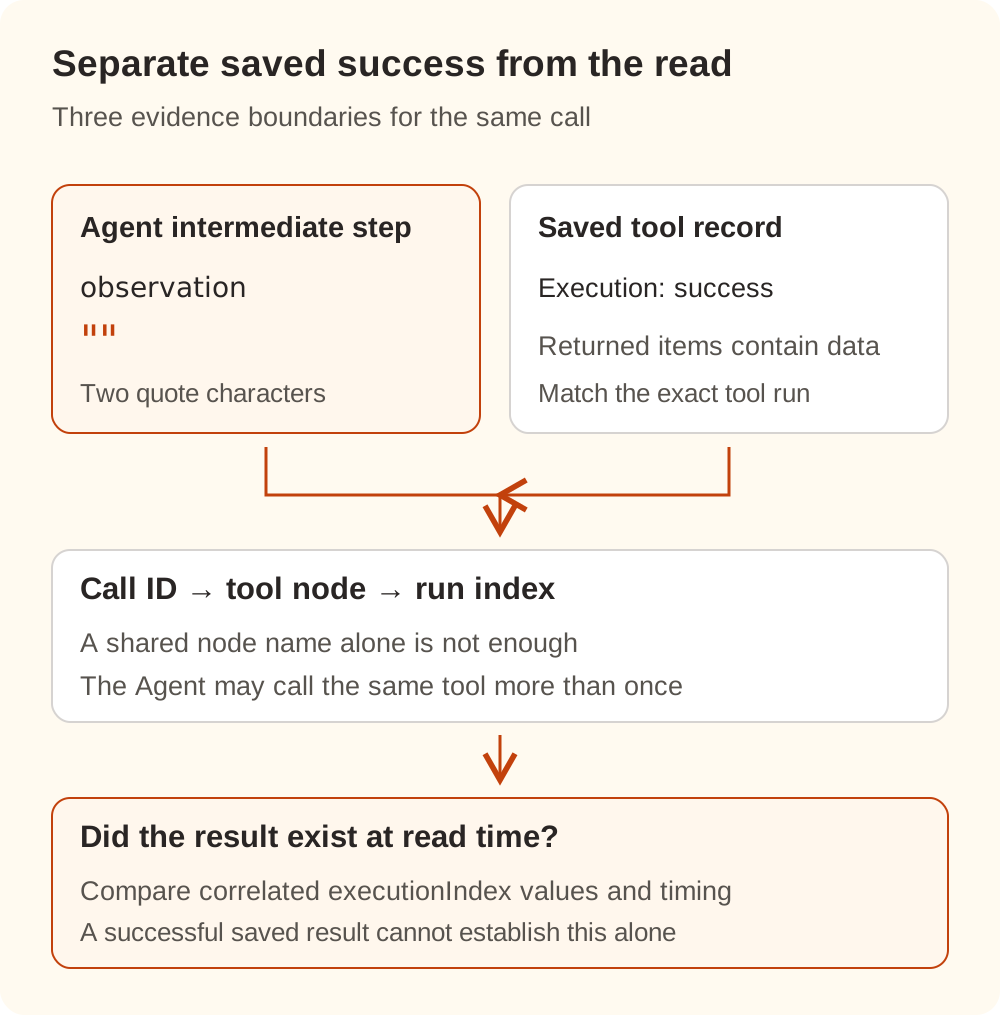
Offline checks using the original function returned the two quotes for missing data and an empty item array. A returned item containing {"response":""} produced serialized array text containing that object; an explicit tool error produced error-object text. These checks establish how the function handles the given inputs, without locating a failure in a running workflow.
Inspect executionOrder on the workflow itself
Open the workflow menu in the upper-right corner, then Settings → Execution order. The official workflow settings reference marks v1 as recommended and v0 as legacy.
The setting also affects ordinary branches:
| Setting | Multi-branch execution |
|---|---|
v0 | Execute the first node of each branch, then the second node of each branch, and so on |
v1 | Complete one branch before moving to the next, with branch order affected by canvas position |
Changing a production workflow's setting therefore requires more than checking its Agent. An older graph may depend on the previous branch order. Validate conditions, merges, loops, and external writes in a copy first. The official execution-order guide explains the historical behavior.
If you have an exported workflow JSON file, this Python 3 snippet reads the setting from either a single workflow object or an array. It prints no nodes, parameters, or credentials and does not modify the file:
import json
from pathlib import Path

data = json.loads(
    Path("workflow.redacted.json").read_text(encoding="utf-8")
)
workflows = data if isinstance(data, list) else [data]
for index, workflow in enumerate(workflows):
    settings = workflow.get("settings") or {}
    print(json.dumps({
        "workflow_index": index,
        "executionOrder": settings.get("executionOrder", "not set"),
    }))
If the field is absent, inspect the effective UI setting, version, and actual execution evidence. Absence alone does not establish v0 or v1. Check an application upgrade separately from migration of an older workflow's settings.
A successful saved run does not establish when its result was read
n8n issue #38870 originally described successful tool output with an empty Agent observation. The reporter later confirmed 2.34.5, correcting an outdated 2.31.4 in the opening description.
On November 8, another user supplied a comparison on 2.46.6, self-hosted, regular execution mode. Changing only executionOrder in a small workflow, they observed the tool starting after the Agent's final model call had finished under v0. Under v1, the tool ran first and the observation was nonempty. This is that user's report. We did not rerun their complete environment or reuse their millisecond timings as our measurements.
We also checked the stable tag's request-scheduling code and its queue consumer. An Agent requesting tools must be scheduled to resume, and different enqueue behavior under v0 and v1 affects its position relative to those tools. Executing the original scheduling-preparation function, followed by an explicitly simplified queue simulation, produced the corresponding order difference. That is still not a full engine test.
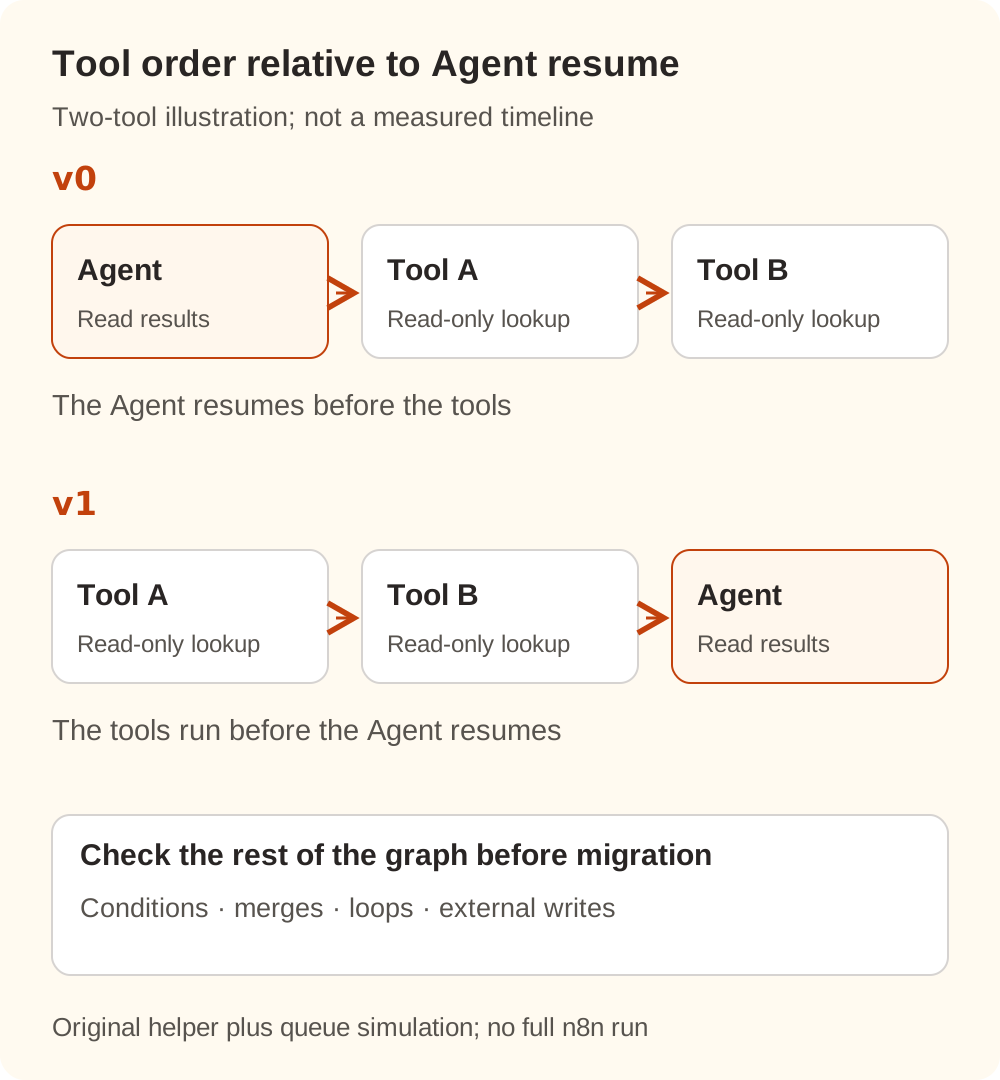
For your execution, correlate the exact tool-call ID with its referenced tool node and run. An Agent can call the same named tool repeatedly; matching only the node name can select the wrong record.
A saved tool record containing data establishes that the data was visible when saved. It does not independently establish what the Agent received at the earlier read. Compare the correlated tool run and Agent resume using their executionIndex values and timing. Canvas position and a visual scan of the execution panel cannot replace that correlation.
The original reporter described intermittency and a latency effect. The newer v0 comparison describes deterministic behavior, while the original workflow's execution order remains unconfirmed in the discussion. Keep those observations separate. The issue was still open when checked; subsequent comments discuss scheduling changes and explicit error observations, without establishing that an official fix has shipped.
Validate in a copy before migrating production
Preserve the original workflow and failure record, then create a test copy that does not receive production events. Keep real notifications, tickets, and database writes out of the initial test.
- Reduce the test to one read-only tool round trip. Keep an Agent, its required model, and one read-only tool returning a public fixed fact, such as “the demo return period is seven days.” Ask the Agent to call that tool before answering.
- Confirm that the call actually happened. The same execution should contain the tool record and matching intermediate step. An answer produced without a tool call does not validate this path.
- Record the original behavior. Keep the version,
executionOrder, matching call ID, presence of tool output, observation type and length, and execution order. Avoid sharing full payloads. - If the original uses
v0, comparev1only in the copy. Keep the input, model, and tool unchanged. Check that the tool finishes first, its result reaches the corresponding observation, and the final answer uses the returned public fact. - Restore and check the rest of the graph. Validate branch, merge, loop, and write ordering against the business requirements before migrating the production workflow through your normal process.
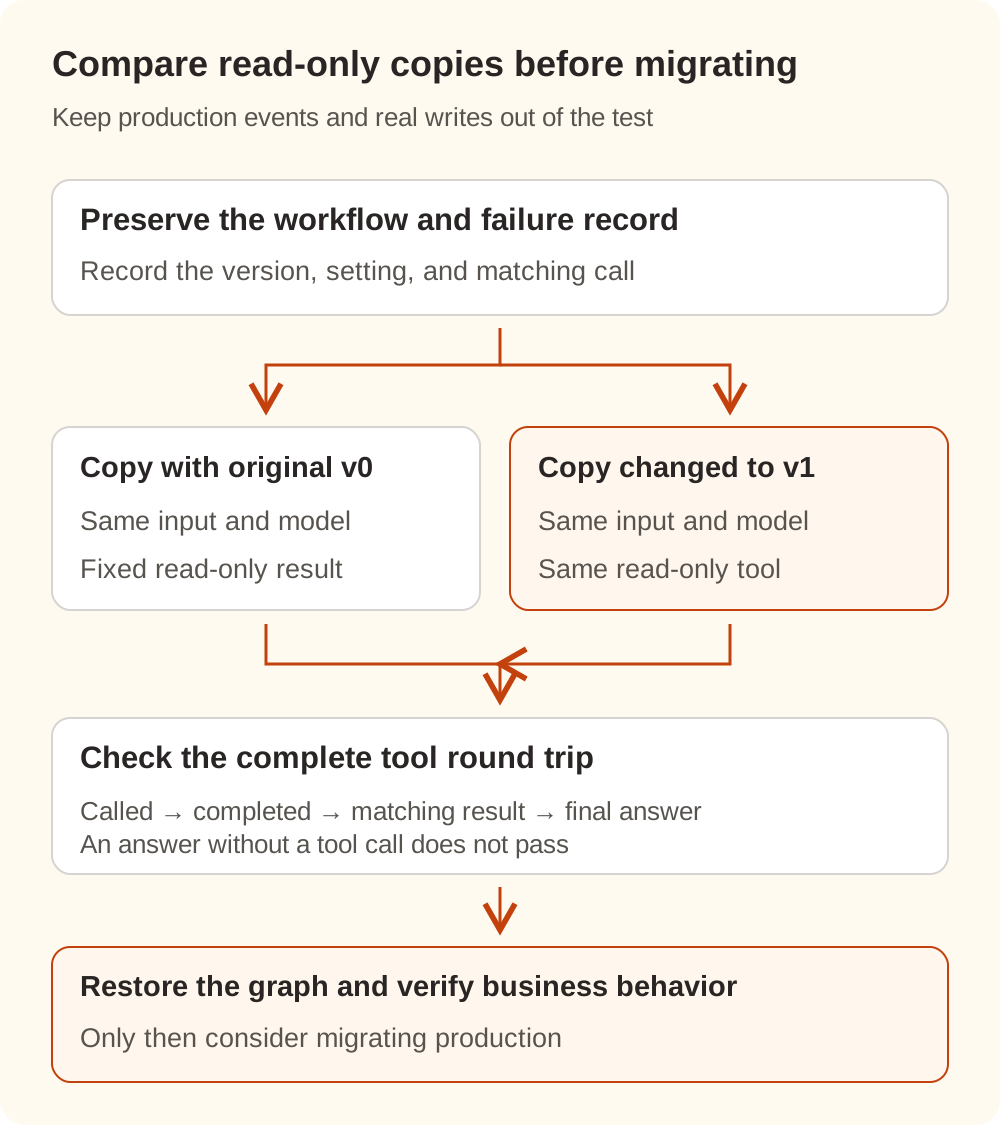
If you already use v1, or the result remains empty after the comparison, inspect whether the tool returned items, which tool run the Agent referenced, and the result shape before it entered the Agent. Avoid forcing another failure into the legacy-order explanation.
Query the result before repeating a possible write
An Agent saying it received nothing is insufficient reason to create another ticket, send another email, or repeat an update. Look up the business object in the external system first, then decide whether to deliver an existing result or execute the action again.
Production automation also needs a stable business identifier and duplicate prevention actually supported by the destination. A fresh n8n execution ID or tool-call ID identifies another run or call; it does not automatically make an external write happen only once. Keep transient network retries and backoff separate from a result-consumption problem.
With Nbility, use the connection basics to confirm the model and request path, then correlate the model calls in usage logs. Those records help establish whether a model request completed. Tool scheduling and observation timing still need inspection in n8n's execution records. Recovery should establish that the matching result reached the Agent and that the business action's real state is known.