Codex Keeps Returning 400 After an Incomplete Response: Check Tool Call History
When response.incomplete is followed by repeated tool-argument JSON errors, inspect the stream, the call, and replayed history before continuing the task.
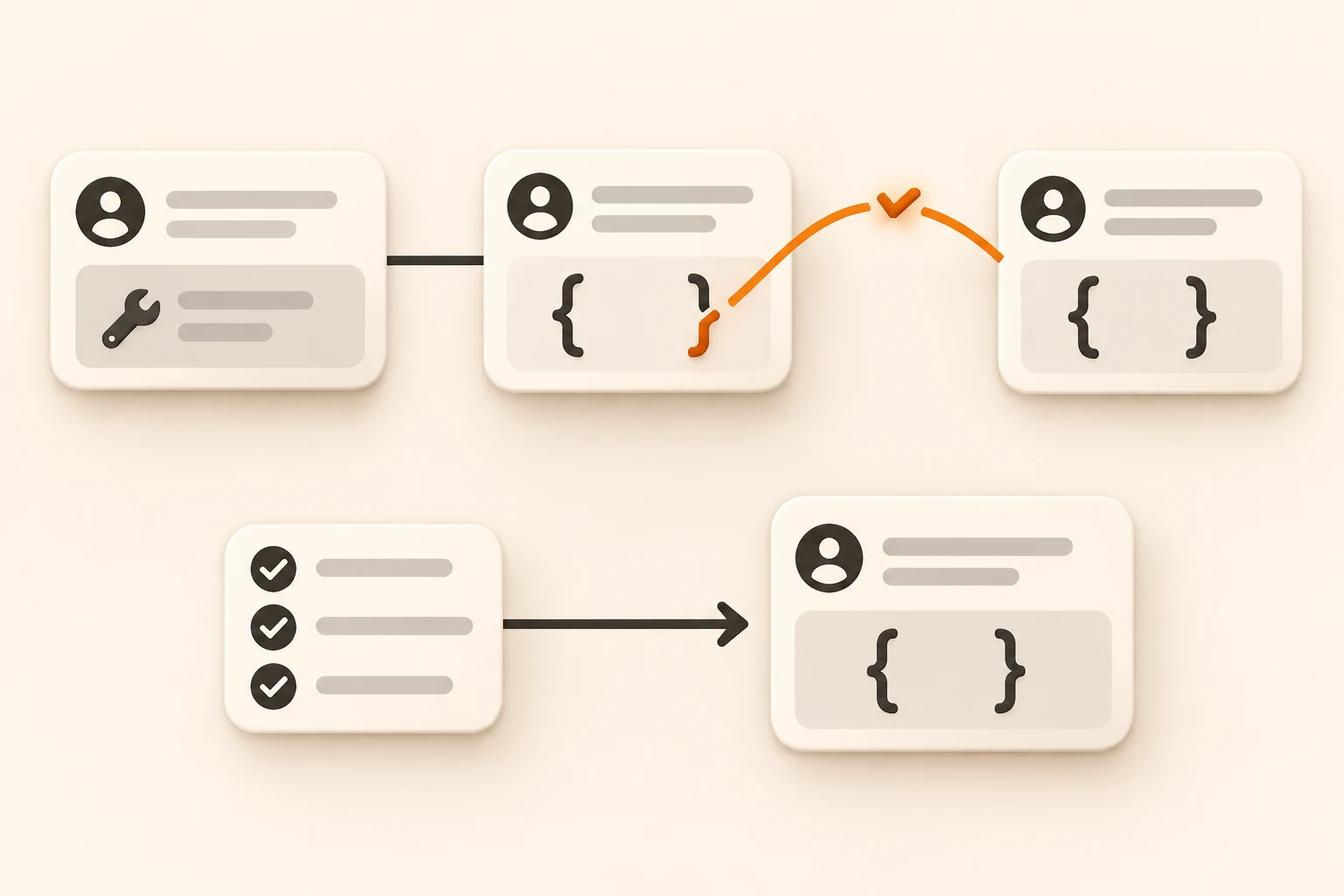
Codex stops with Incomplete response returned, reason: max_output_tokens. You ask it to continue, and subsequent turns repeatedly fail with a 400 mentioning invalid function.arguments JSON or an Unterminated string. Check whether an unfinished tool call from the interrupted turn is being replayed in later requests.
Pause automatic retries and preserve the surrounding events and actual project state. A larger output budget may reduce future truncation; an invalid call already stored in a conversation needs its own recovery step.
This guide uses official Responses documentation checked on November 9, 2026, and a versioned Codex report with a mock server and follow-up discussion. We did not reproduce the full Codex failure against a live upstream or verify how every compatible provider validates history. For an empty answer without a subsequent argument error, start with the empty-response diagnostic guide.
Separate the interrupted turn from the next failed request
Codex issue #56850 describes Linux, a custom Responses provider, and 0.165.0-alpha.1. Its mock server returns a truncated function_call followed by response.incomplete, then checks whether the next request carries the broken arguments again.
The reported sequence is:
- Generation stops partway through a string in the tool's
arguments. - The client tries to parse the call and records a tool output describing the parsing failure.
- The turn fails because of the output limit.
- Later requests replay the same call, and a provider that strictly validates historical arguments rejects the input.
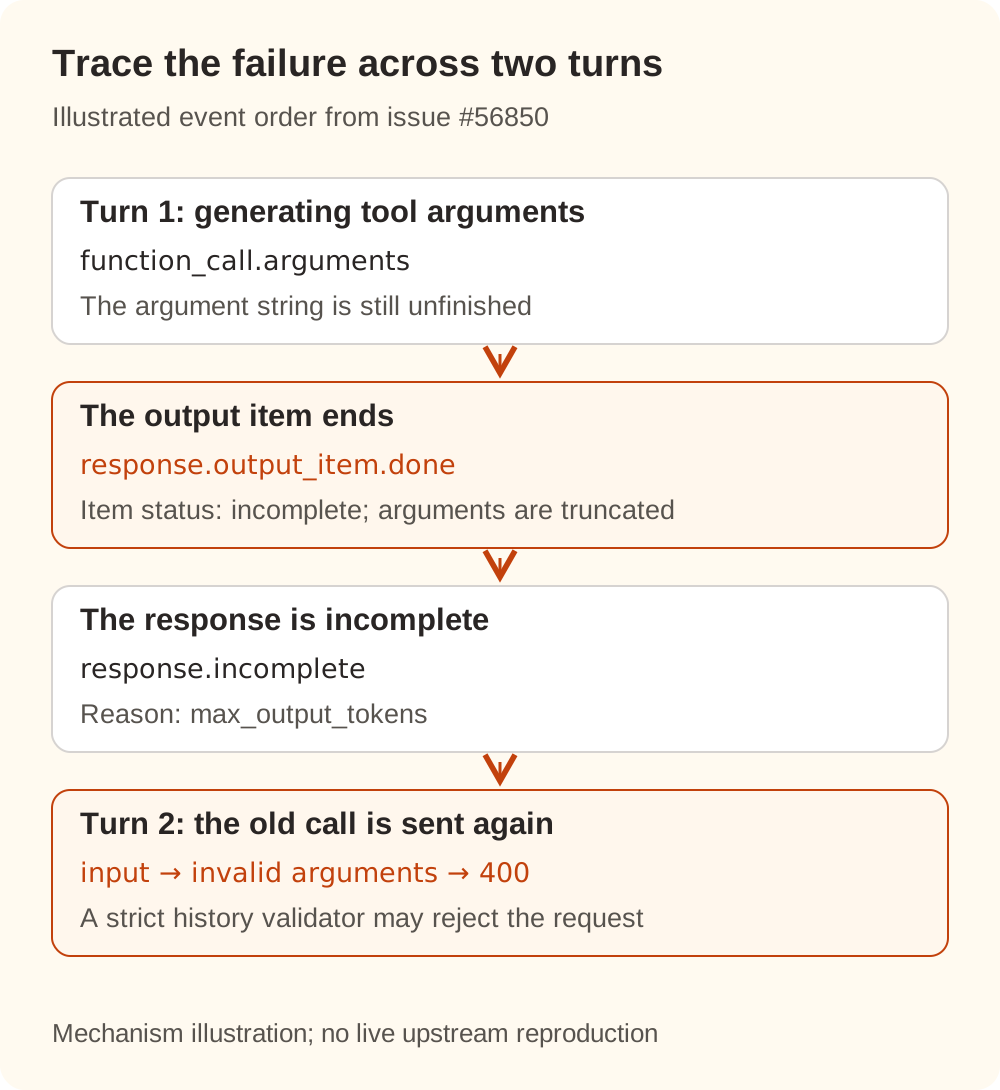
These are two separate recovery questions: why generation stopped, and why a later request still contains invalid input. Increasing the next generation's budget does not complete an old argument string.
One community participant reported reproducing the replay with a mock server and a build from main@970111f6cb. That mock accepts the second request, so the reproduction alone does not demonstrate a real upstream returning 400. Two other comments are explicitly source analysis, and both disclose AI assistance.
The issue remained open when checked. GitHub's latest stable release was 0.167.0, which includes #58456, an improvement to failed inference traces. That change alone does not establish that the reported event ordering or already affected conversations are repaired. The older alpha report does not establish a universal current stable defect, and a patch in a comment is not an official recovery command.
Read the response, the call, and the continuation input
Responses output consists of typed items. A function_call stores JSON encoded as a string in arguments. Your application returns a function_call_output associated with the original call_id. The native API format comparison explains how this differs from other tool protocols.
Keep three layers of evidence:
| Layer | Inspect | What it establishes |
|---|---|---|
| Whole response | status, incomplete_details.reason, terminal stream event | Whether the turn finished and why it stopped |
| Individual call | type, status when available, name, complete arguments | Whether that call is complete and its arguments parse and satisfy the tool schema |
| Next request | Call/output call_id values and replayed items | Which historical calls were sent again and whether outputs have matching calls |
The official reasoning guide explains that the output budget includes reasoning and visible output. It can run out before a visible answer appears. reason: "max_output_tokens" therefore does not mean the entire budget went into displayed text, or establish that the input context was too long.
Stream events have different scopes. The function-calling guide describes argument fragments in response.function_call_arguments.delta and finalized arguments in response.function_call_arguments.done. The event reference defines response.output_item.done as an output item being marked done; relevant item schemas still allow an incomplete status. The word done in an event name is insufficient evidence that a tool executed successfully.
Arguments must be complete, satisfy the schema, and pass the application's permission checks. A later response failure also does not undo other tools that already ran successfully. Check their actual effects before resuming.
Inspect a small, public history example
Save this teaching fixture as request.redacted.json. It represents a truncated call with a matching parsing-error output. It is neither a complete API request nor a real user log.
{
  "input": [
    {
      "type": "function_call",
      "status": "incomplete",
      "call_id": "call_demo",
      "name": "read_file",
      "arguments": "{\"path\":\"src/app"
    },
    {
      "type": "function_call_output",
      "call_id": "call_demo",
      "output": "failed to parse function arguments"
    }
  ]
}
The outer file is valid JSON. The JSON inside the arguments string is unfinished. A matching output can explain a parsing failure without repairing those arguments.
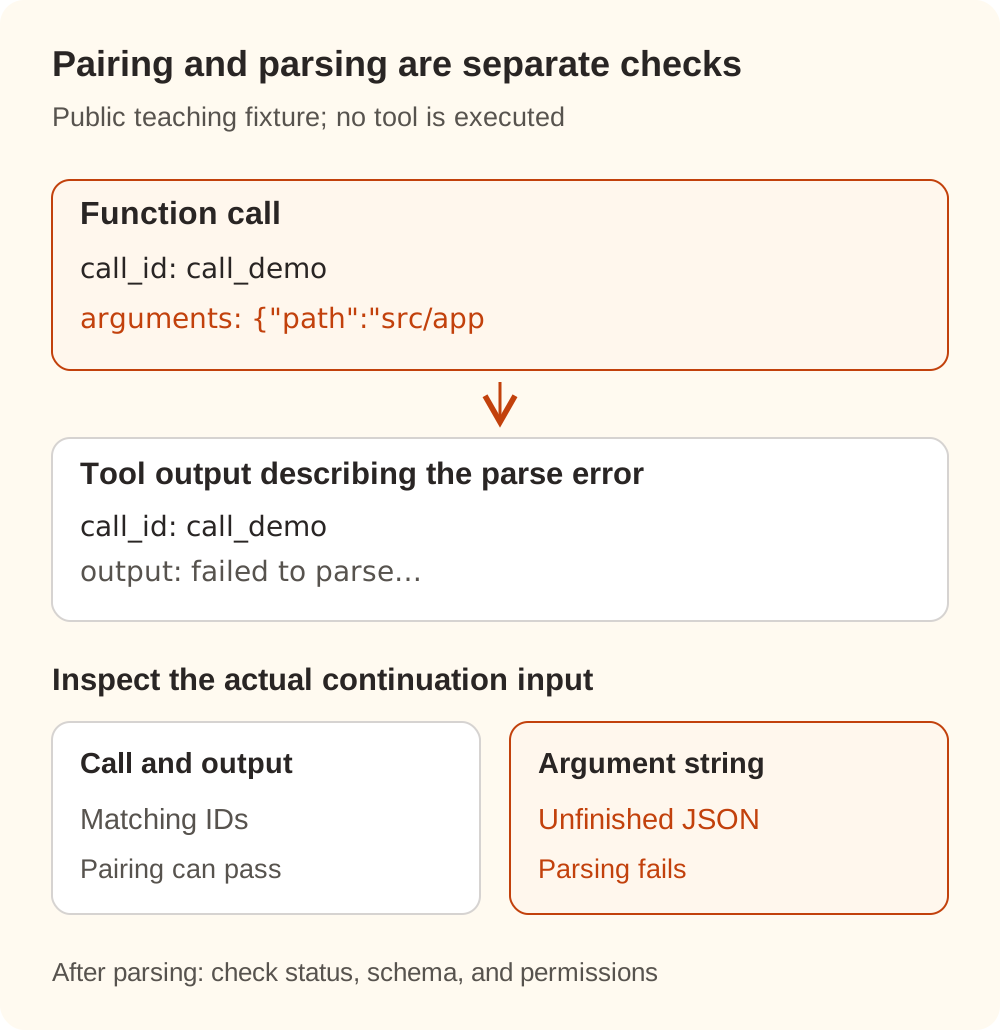
This Python 3 script uses only the standard library. It prints call identifiers, status, and validation flags, without printing the arguments:
import json
from pathlib import Path

request = json.loads(
    Path("request.redacted.json").read_text(encoding="utf-8")
)
items = request.get("input")
if not isinstance(items, list):
    raise SystemExit("Expected a request with an input array")

for item in items:
    if not isinstance(item, dict) or item.get("type") != "function_call":
        continue
    try:
        arguments = json.loads(item.get("arguments", ""))
        valid_json = True
        is_object = isinstance(arguments, dict)
    except (json.JSONDecodeError, TypeError):
        valid_json = False
        is_object = False
    print(json.dumps({
        "call_id": item.get("call_id"),
        "status": item.get("status"),
        "valid_json": valid_json,
        "is_object": is_object,
    }))
The fixture produces valid_json: false for call_demo. A complete argument string containing {"path":"src/app"} makes both validation flags true, while the item's existing incomplete status remains. Successful parsing is only one check: this script does not validate the tool schema, call/output pairing, permissions, or execution results.
We ran this example offline and checked complete arguments, a valid JSON scalar, and missing arguments as additional inputs. No model requests were sent. The exercise separates JSON syntax from call/output pairing; it is not a full Codex or gateway compatibility test. The check applies specifically to function_call. A custom_tool_call can use free-form text and must not be subjected to this JSON rule indiscriminately.
Recover the task in a controlled order
Preserve evidence that can be correlated
Record the client version, provider type, exact model ID, time, final API path, and the event types, item statuses, and call_id values around the interruption. Compare the original failure with later 400s and check whether they point to the same historical call.
If inspecting arguments is necessary, keep a redacted copy in a controlled local file. Avoid publishing full requests, source code, tokens, or credentials. Gateway records and client records have different scopes; the client or actual outgoing request is needed to establish which history was replayed.
Check what already happened
In the project directory, run:
git status --short
git diff --stat
Inspect relevant files, test results, and any running tasks as well. For messages, tickets, or other external writes, query the actual result before repeating an action. A missing success response does not establish that the action never ran.
Stop resending the same invalid input
If every continuation contains the same invalid arguments, waiting and resending will not make that input valid. Keep this separate from transient rate limits, where bounded retries and backoff can be appropriate.
Use an official conversation recovery mechanism when one is documented for your version. If no reliable in-place recovery is available, preserve the original record and start a new conversation with the goal, constraints, verified file state, and remaining work. Leave the raw broken tool items out of that handoff.
Avoid completing an old argument string by hand and executing it, or treating {} as a universal repair. Either can change the intended action. Editing raw session files or deleting only one tool output can also break call/output pairing.
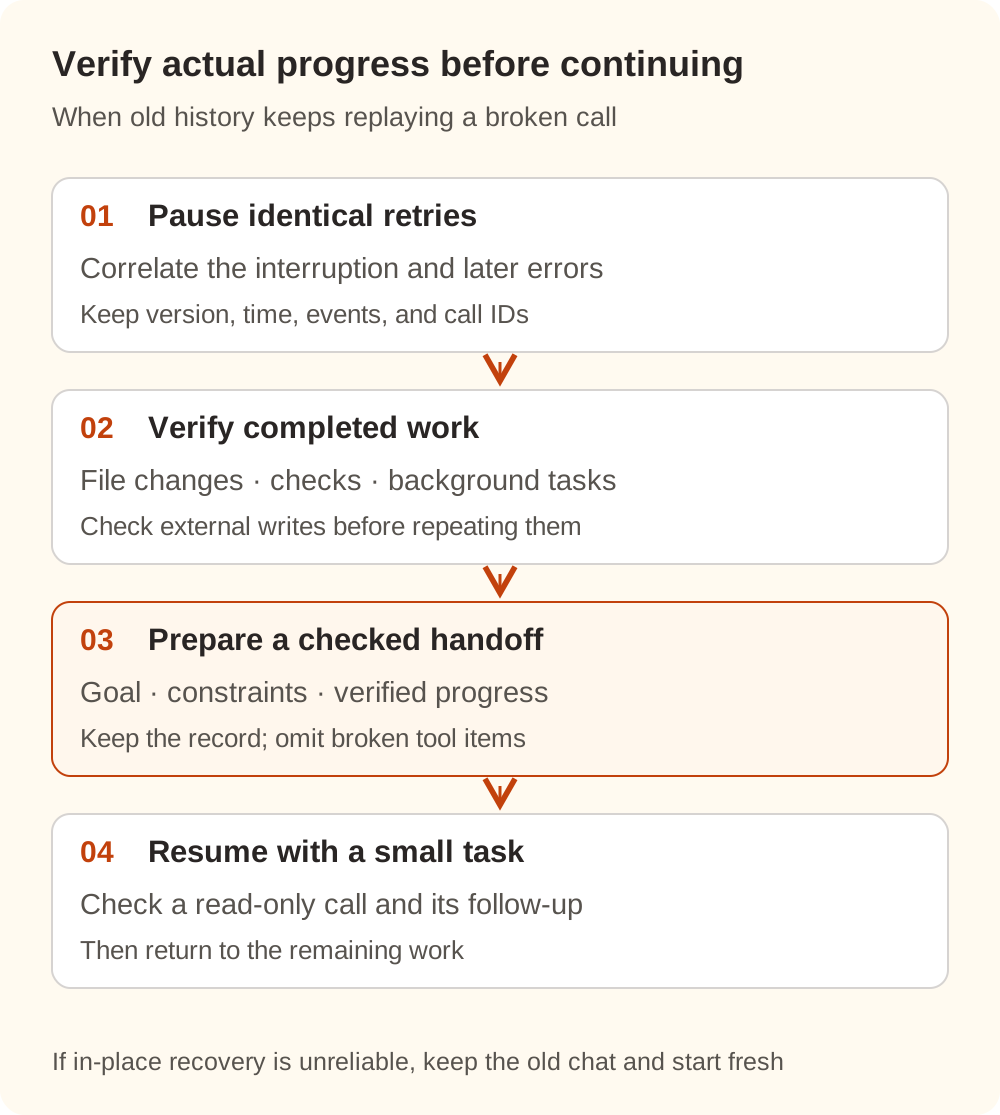
Adapt this handoff to the real task:
Continue: <goal and completion criteria>
Constraints: <behavior, files, or data that must be preserved>
Verified state: <files, completed edits, checks run and their results>
Last interruption: <error and time; omit broken tool-call items>
Still uncertain: <whether background commands or external writes finished>
Next: verify the state read-only, then complete <smallest remaining step>.
First validate a small read-only tool call and its follow-up response in the new conversation, then restore the larger task gradually. A successful text-only exchange establishes only that simpler path.
Narrow the investigation when using Nbility
Use the connection basics to verify the address, model, and actual request path, then check capability boundaries in the Responses documentation. A listed model or successful chat does not establish a complete tool round trip or stateful continuation. previous_response_id also depends on backend support and retained state.
Correlate calls by time and request information in the usage logs, then compare them with redacted client events. Gateway logs may not contain the client's original conversation history; one successful status cannot establish that later history is repaired.
If a small task works in a new conversation while the old one keeps replaying the same broken call, investigate history recovery. If the new conversation fails too, continue checking the protocol, model capabilities, and parameters. Distinguishing these cases gives you a concrete next step for generation truncation, invalid history, or an unsupported request path.