Why SSE Text Gets Corrupted: Byte Chunks Are Not Event Boundaries
A local example separates UTF-8 decoding, SSE framing, and application parsing, covering split characters, multiline data, comments, and incomplete events.

Intermittent missing text, broken characters, or Unexpected end of JSON input can come from treating each network read as a complete message. An SSE event can span many reads, and a single UTF-8 character can span byte chunks. Changing models does not fix that boundary error.
This article was checked on November 10, 2026, against WHATWG, MDN, and eventsource-parser 4.1.3. The synthetic local example below was executed. It does not call a model or reproduce a particular proxy failure.
Decode bytes, assemble events, then interpret the protocol
These are three distinct stages. The network supplies bytes. A stateful UTF-8 decoder produces text. An SSE parser assembles events. Only then should the application interpret data according to its API protocol.
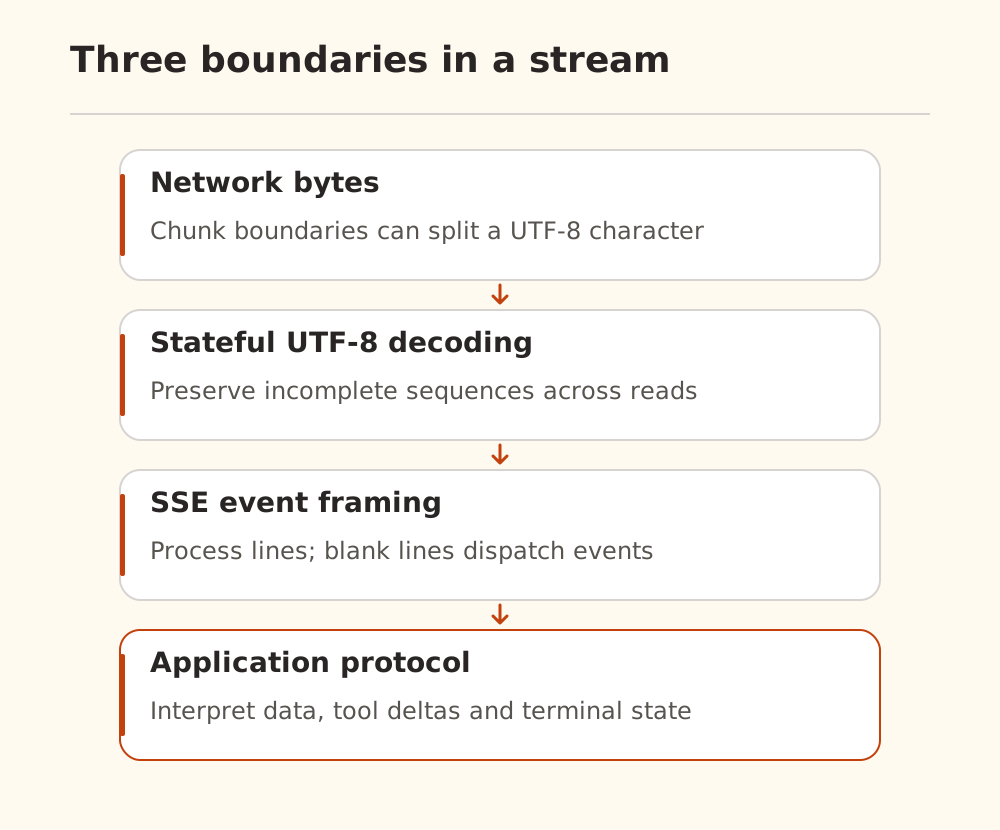
Calling JSON.parse after every reader.read() can parse half a JSON object. Creating a new decoder for every chunk can corrupt a character split across chunks. One read can also contain the end of one event, several complete events, and the beginning of another.
The WHATWG specification defines UTF-8 decoding and line processing. Blank lines dispatch events, multiple data: lines are joined with newlines, and colon-prefixed lines are comments. CRLF and lone CR are valid line endings too, so splitting only on \n\n is insufficient.
A byte-at-a-time example
This fixture sends one byte per chunk, deliberately splitting characters, fields, and CRLF pairs. In a separate demo directory, install the dependency and use a modern Node.js runtime with the required Web Streams APIs:
npm install eventsource-parser@4.1.3
node demo.mjs
Save this as demo.mjs:
import assert from 'node:assert/strict';
import { EventSourceParserStream } from 'eventsource-parser/stream';

async function readEvents(response) {
  if (!response.ok) throw new Error(`HTTP ${response.status}`);
  const type = response.headers.get('content-type')?.split(';')[0].trim();
  if (type !== 'text/event-stream' || !response.body) {
    throw new Error('Expected an SSE response body');
  }
  const reader = response.body
    .pipeThrough(new TextDecoderStream('utf-8', { fatal: true }))
    .pipeThrough(new EventSourceParserStream({ maxBufferSize: 65536 }))
    .getReader();
  const events = [];
  try {
    while (true) {
      const { value, done } = await reader.read();
      if (done) break;
      events.push({ event: value.event || 'message', data: value.data });
    }
  } finally {
    await reader.cancel();
    reader.releaseLock();
  }
  return events;
}

const bytes = new TextEncoder().encode(
  ': keepalive\r\n\r\nevent: note\r\ndata: 你\r\ndata: 好\r\n\r\ndata: unfinished'
);
const body = new ReadableStream({
  start(controller) {
    for (const byte of bytes) controller.enqueue(Uint8Array.of(byte));
    controller.close();
  },
});
const response = new Response(body, {
  headers: { 'Content-Type': 'text/event-stream; charset=utf-8' },
});
const events = await readEvents(response);
assert.deepEqual(events, [{ event: 'note', data: '你\n好' }]);
console.log(events);
The local run produced one note event with data 你\n好. The assertion checks intact Unicode, multiline data assembly, ignored comments, and rejection of the unfinished event that lacks its terminating blank line.
This is a finite parsing demonstration. Its events array retains everything; a production consumer should process events incrementally and enforce connection deadlines, total deadlines, and output limits. maxBufferSize limits pending parser characters, not the total response size. See the library documentation for its API.
Framing success does not prove generation success
SSE does not require JSON data or define model completion. The fixture's data is simply a string.
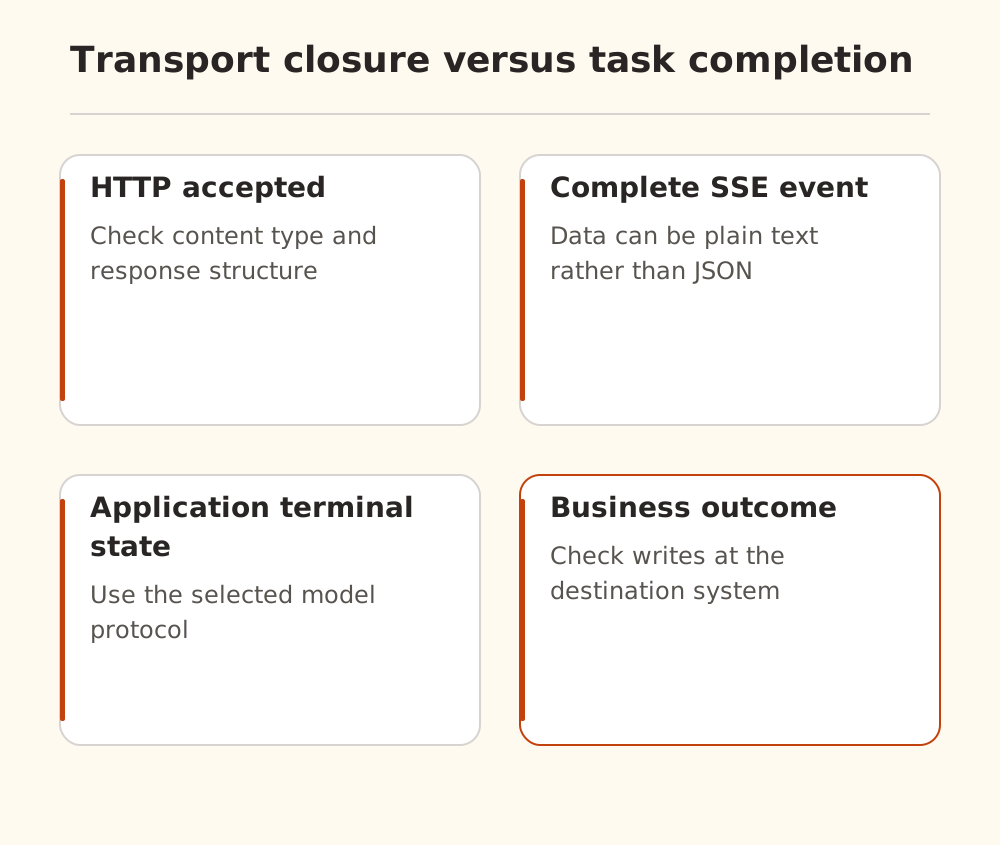
A model client must still interpret text deltas, tool calls, and terminal status using the selected API. Do not make one parser guess several protocols, or treat a matching string anywhere in data as a universal termination signal. The Chat Completions guide covers that interface; other protocols have their own event rules.
Check HTTP status and content type before parsing. An HTML page or error JSON under an unexpected response type needs a different path. Other causes of empty output are covered in empty-response troubleshooting.
Keepalives and reconnection need separate checks
MDN explains how comments can keep a connection active. A : keepalive comment demonstrates transport activity, not answer progress. Track those separately when diagnosing long-thinking timeouts.
A fetch consumer also does not acquire native browser EventSource reconnection behavior merely by using an SSE parser. Whether a new connection can resume an old request depends on the service protocol. Appending a newly generated answer to an interrupted answer can create a misleading composite result.
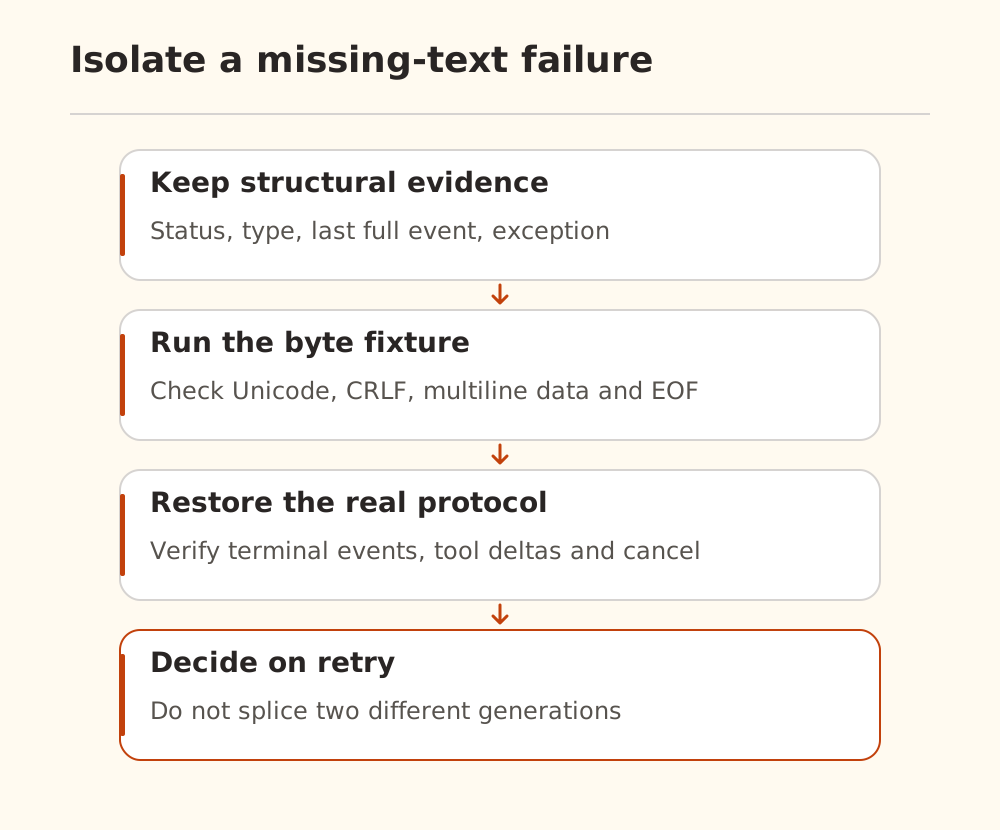
Start with this deterministic fixture, then try a finite, redacted sample. Once framing works, inspect terminal events, cancellation, and tool deltas. Use bounded retries only after deciding that a new request is appropriate. A timestamp, content type, last complete event type, and exception category are more useful for public debugging than a dump of private text or authorization headers.