Using the Free API Credits That Come With ChatGPT Pro and Business
ChatGPT Pro now includes $100–$500 of OpenAI API credits each month, and Business gives credits per paid seat up to $500 per workspace. Credits go to an API organization you own, expire at the end of the billing cycle, and don't cover Codex run with an API key.
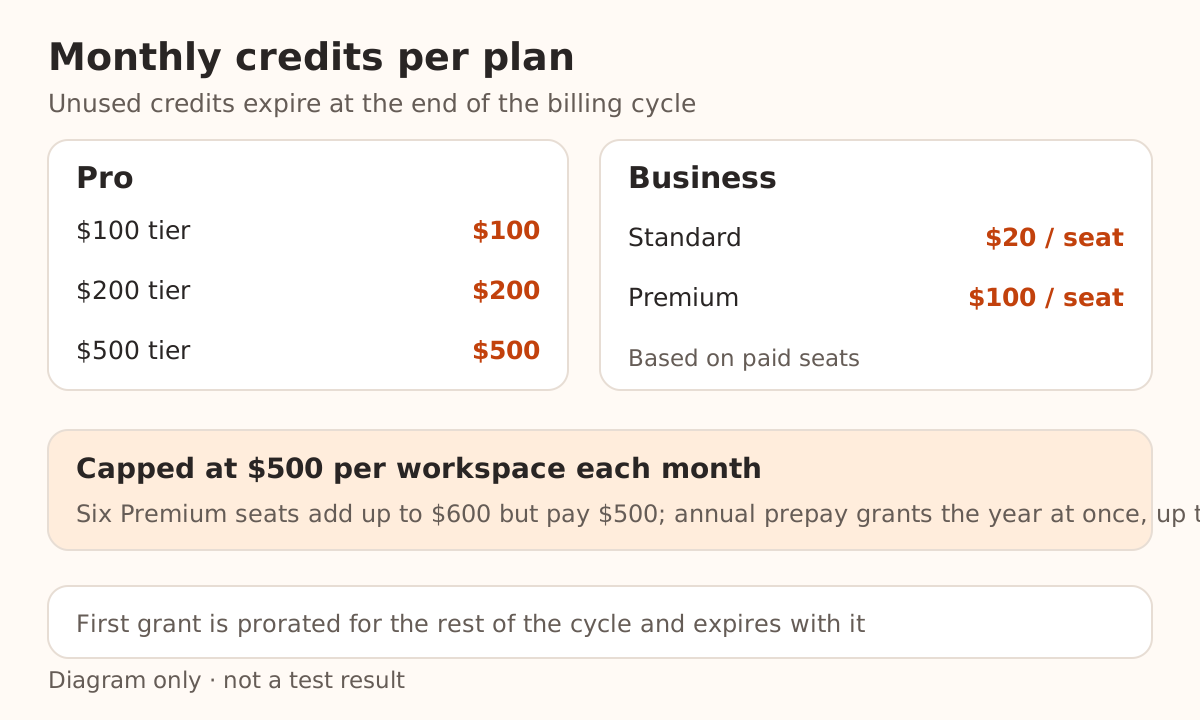
Since October 28, 2026, eligible ChatGPT Pro and Business subscriptions can claim monthly OpenAI API credits. Pro gets $100, $200, or $500 depending on the tier; Business gets credits per paid seat, capped at $500 per workspace per month. The credits land in the one API organization you link, and anything you don't use expires at the end of the billing cycle.
They pay for Responses, Agents, image, and real-time voice usage, among others. They don't cover Codex run with an API key, and they don't raise your ChatGPT or signed-in Codex limits.
Checked on November 17, 2026 against OpenAI's changelog, the API credits for ChatGPT subscribers guide, the pricing page, and the rate limits guide. We did not claim credits with a real subscription or send billed requests; the cost figures below are estimates from official prices.
How much does each plan get?
| ChatGPT subscription | Monthly API credits |
|---|---|
| Pro ($100 tier) | $100 |
| Pro ($200 tier) | $200 |
| Pro ($500 tier) | $500 |
| Business Standard | $20 per paid Standard seat |
| Business Premium | $100 per paid Premium seat |
Business credits are pooled across the workspace and capped at $500 a month. Eight Standard seats give $160; six Premium seats would add up to $600 but are capped at $500. Business workspaces that pay annually upfront receive the whole year's grant at once, capped at $6,000, and it expires at the end of the annual billing cycle.
Your first grant is prorated for the time left in the current billing cycle and expires when that cycle ends. OpenAI doesn't publish the exact formula. With 10 days left in a 30-day cycle, a $200-tier subscriber would get roughly $67 the first time.
Who is eligible?
The guide lists three requirements:
- A paid ChatGPT Pro or Business subscription that is at least seven days old. Free trials and complimentary subscriptions don't count.
- You own both the subscription (or Business workspace) and the API organization that receives the credits. Regular Business members can't claim on their own.
- Your ChatGPT account and the API account used for linking share the same email address.
Enterprise is excluded, as are Plus, Go, and Free.
Location matters separately. The benefit page has no region rule of its own, but the API does: as of this check, OpenAI's supported countries and territories list does not include mainland China, Hong Kong, or Macao, and it warns that accessing or offering access from outside the list may get an account blocked or suspended. Having a ChatGPT subscription doesn't change where the API may be used.
How do you claim the credits?
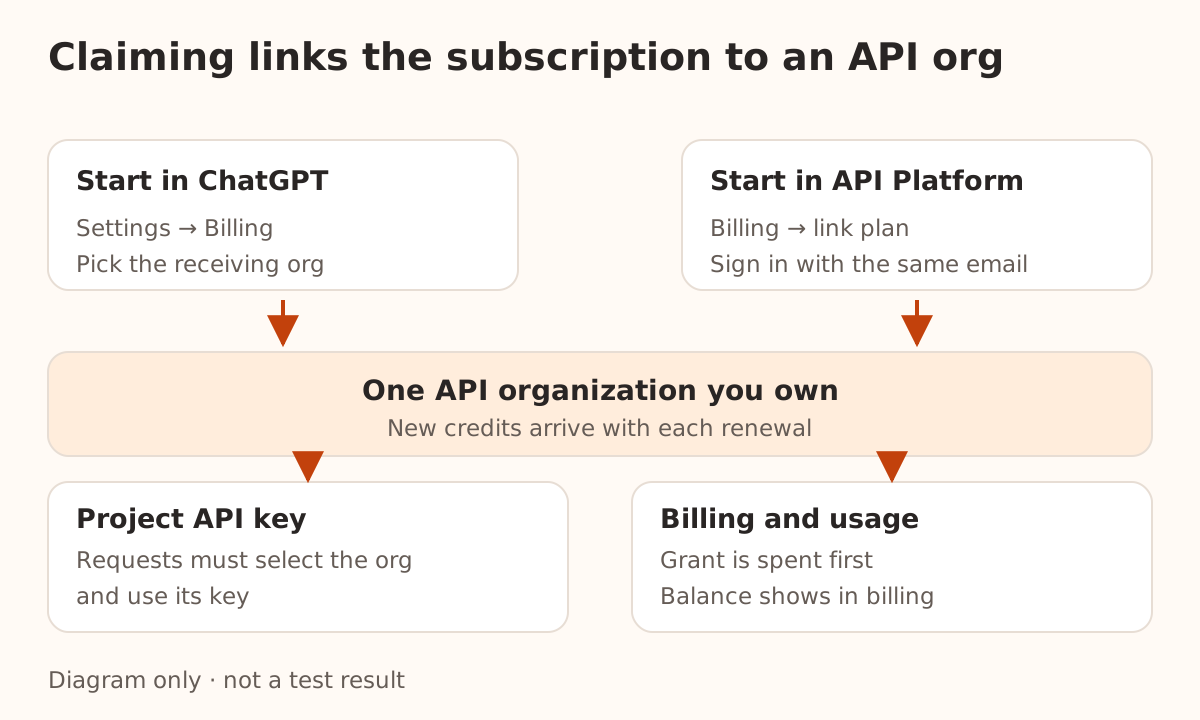
There are two entry points. Both link the subscription benefit to an API organization you own:
- From ChatGPT: sign in with the account that owns the subscription. For Pro, open Settings → Billing; for Business, open the workspace billing settings or the Admin Console. Start the API credits claim, confirm the receiving API organization, and activate.
- From API Platform: sign in to platform.openai.com with the same email, select the organization that should receive the credits, open Billing, pick the subscription or workspace to link, and confirm.
If you've never used the API, you can link your personal API organization. You activate once; new credits arrive automatically each time the subscription renews, and the balance shows in API Platform billing. While free credits are available, no API payment method is required.
To move the benefit to a different organization, you currently need to contact OpenAI support.
What can the credits pay for?
The credits cover paid API Platform usage billed to the linked organization. OpenAI's examples:
- the Responses API (text, code, image understanding);
- the Agents API, including OpenAI-hosted sandbox charges;
- the Decisions API;
- GPT-Live and the Realtime API;
- the Images API for generation and editing;
- built-in tools such as web search, file search, and Code Interpreter, with their usage and storage charges.
That list says "including." Chat Completions isn't named separately; the guide only adds that other APIs are available through API Platform. If most of your traffic uses Chat Completions, send one small request after claiming and confirm in the Usage dashboard that it drew from the free credits.
Two things are explicitly excluded:
- Codex usage through API keys. If you set up Codex CLI with a key, these credits won't pay for it.
- ChatGPT and signed-in Codex limits. The credits don't increase either one; those allowances are separate.
Can third-party clients use the credits?
It depends on which account the request is billed to, not on which client sends it.
The credits belong only to the linked organization. Requests must select that organization and use an API key from one of its projects. If Chatbox, Cherry Studio, or your own code points its base URL at OpenAI and uses that organization's key, usage is billed to the organization and drawn from the free credits. For what the base URL and key each do, see what an OpenAI-compatible API is.
If the client points at another provider's address and key, that provider bills the request and these credits play no part. Nbility works the same way: Nbility keys are billed to your Nbility account, and ChatGPT subscription credits can't be moved there.
Don't hand your OpenAI key to other people or a third-party relay just to "use up" the credits. Anyone holding the key spends your credits, and after that, any balance you've purchased. For storing keys and handling a leak, see how to keep API keys safe.
How far does $100 go?
Assume each request sends 20,000 input tokens and gets 2,000 output tokens back (output includes reasoning tokens, which OpenAI bills as output), with no cache hits, under 272K context, at Standard prices:
| Model | Input / output price (per 1M tokens) | Cost per request | Requests per $100 |
|---|---|---|---|
gpt-6-luna | $0.10 / $0.50 | $0.003 | about 33,000 |
gpt-6.1-terra | $1.00 / $5.00 | $0.03 | about 3,300 |
gpt-6.1-sol | $2.00 / $10.00 | $0.06 | about 1,600 |
gpt-6-astra | $10.00 / $50.00 | $0.30 | about 330 |
For Terra: 20,000 × $1 / 1,000,000 + 2,000 × $5 / 1,000,000 = $0.02 + $0.01 = $0.03.
Real usage moves with reasoning effort, tool calls, and growing multi-turn context, and an agent task can take dozens of requests, so read the table as an order of magnitude. Batch and Flex cost half as much for the same model, and prompt caching cuts input costs when a long prompt repeats.
What happens when the credits run out or expire?
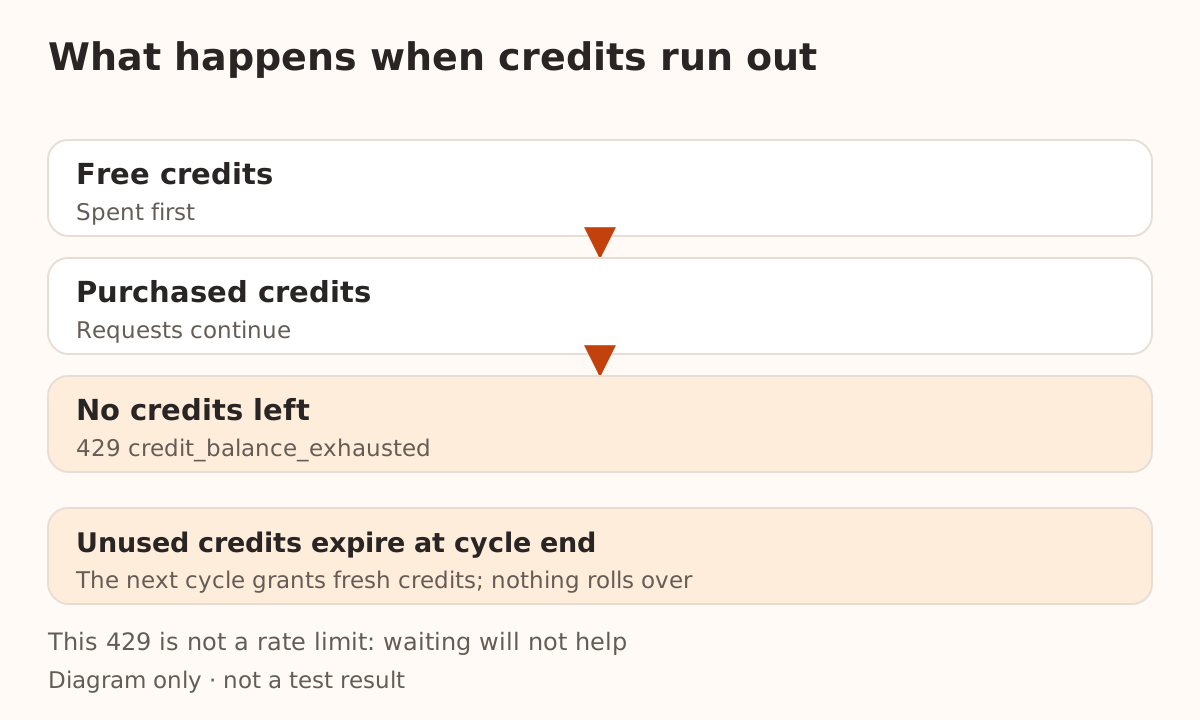
The organization spends free credits before purchased ones:
| When free credits run out | Result |
|---|---|
| Purchased credits remain | Requests continue and draw on purchased credits |
| No credits remain | Requests fail with HTTP 429 and error code credit_balance_exhausted |
That 429 shares a status code with rate limiting but means something else. Running out of balance won't fix itself if you wait; a rate limit usually clears in seconds. Code that sees credit_balance_exhausted should stop and ask for a top-up rather than retry on a backoff schedule. The 429 retry storm write-up explains why retries should depend on the error's cause.
If you don't want to spend your own money once the free credits are gone, don't add paid credits or enable Auto Recharge on that organization. If you need uninterrupted service, do the opposite.
Unused credits expire at the end of the billing cycle and don't roll over. After you cancel, no new grants arrive, but credits already issued remain usable until they expire.
Check your rate limits too
The benefit is subject to API rate limits; see your organization's Limits page for the numbers.
OpenAI's usage tiers rise with "total credit purchases." An organization that has never purchased credits sits in the Free tier with a $100 monthly usage limit; $5 in purchases moves it to Build, with a $500 limit. The guide doesn't say whether subscription credits count as purchases. So an organization on the $200 or $500 Pro tier that has never paid for credits may hit the usage limit before it runs out of credit. Check the current tier and monthly limit on the Limits page after claiming.
FAQ
Do credits accumulate? Not across cycles. Upgrading your Pro plan mid-cycle can add some prorated credit for the rest of the cycle; later grants follow the new plan, up to $500 per billing cycle.
What if I move from Pro to Business? The Pro link ends. Once the Business subscription has been paid and active for seven days, a workspace owner can link again and claim under the Business rules.
What if I downgrade to Plus? The link is removed at the end of the billing cycle and no new grants arrive. Credits already issued stay usable until they expire.