Gemini Argon's Million Tokens Must Cover Reading, Reasoning, and Writing
Understand Argon's shared context budget, the 64K synchronous limit, background long decode, and how to collect and verify every output segment.

A model that accepts a large document collection still needs room to reason about it and write an answer. Gemini 4 Argon makes that relationship explicit: input, thinking, and output share a single 1,048,576-token window. A million-token context and million-token output are not two allowances you can add together.
Google announced general availability of gemini-4-argon on October 13, 2026. This article checks the changelog, Argon guide, and long decode documentation as of November 11. We have not run a million-token request or measured recall or generation speed.
Budget for all three activities
Conversation history, tool declarations, and multimodal material occupy input space. Thinking consumes room too. The final answer must fit alongside them.
For a hypothetical input of 700,000 tokens, at most 348,576 tokens remain for thinking and output. That is an arithmetic example, not a recorded API call. Actual requests must account for the rest of their context, including tools. Planning a 100,000-token answer does not mean every other available token can safely become source material.
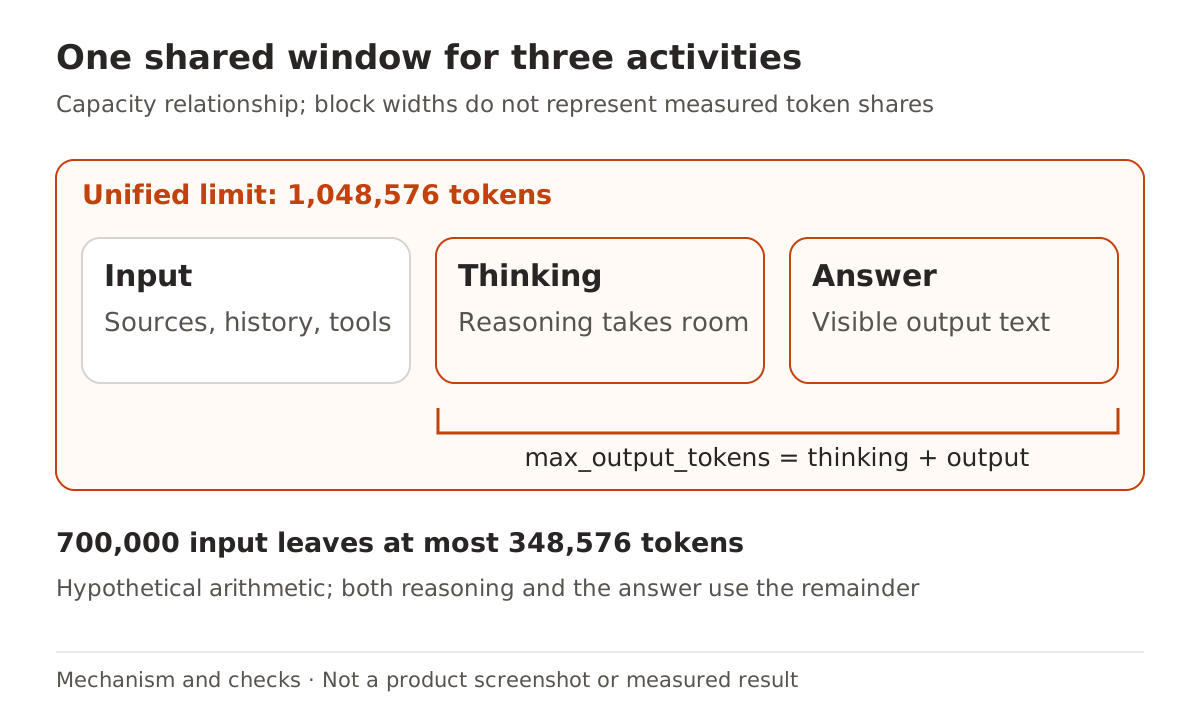
max_output_tokens imposes another limit on thinking plus output. If reasoning uses much of that allowance, the answer gets less. Argon supports low, medium, and high thinking levels, with medium as the default; increasing the level does not enlarge the window. When an answer stops early, inspect status and limits before reducing input, changing thinking effort, or splitting the task. The context budgeting guide covers the general approach.
Going beyond 64K changes the execution path
| Path | Output behavior | What to verify |
|---|---|---|
| Standard synchronous request | Up to 65,536 tokens by default | Whether thinking and text reached the shared output cap |
| Background long decode | background: true and an explicit max_output_tokens above 65,536 | Stored interaction ID, terminal status, and every output segment |
Enabling background execution without increasing the allowance still stops at 64K. Long decode also remains constrained by the unified window minus input. The documentation provides client-side continuation for applications that need their own reconnection or retry control, or do not want interactions stored. Merely waiting longer on an ordinary synchronous request does not implement continuation.
In background mode, the server advances through 64K continuation hops. Each hop adds a model_output step. Reading only the last step can hide the beginning of a successful response; reading only the first can hide everything that followed.
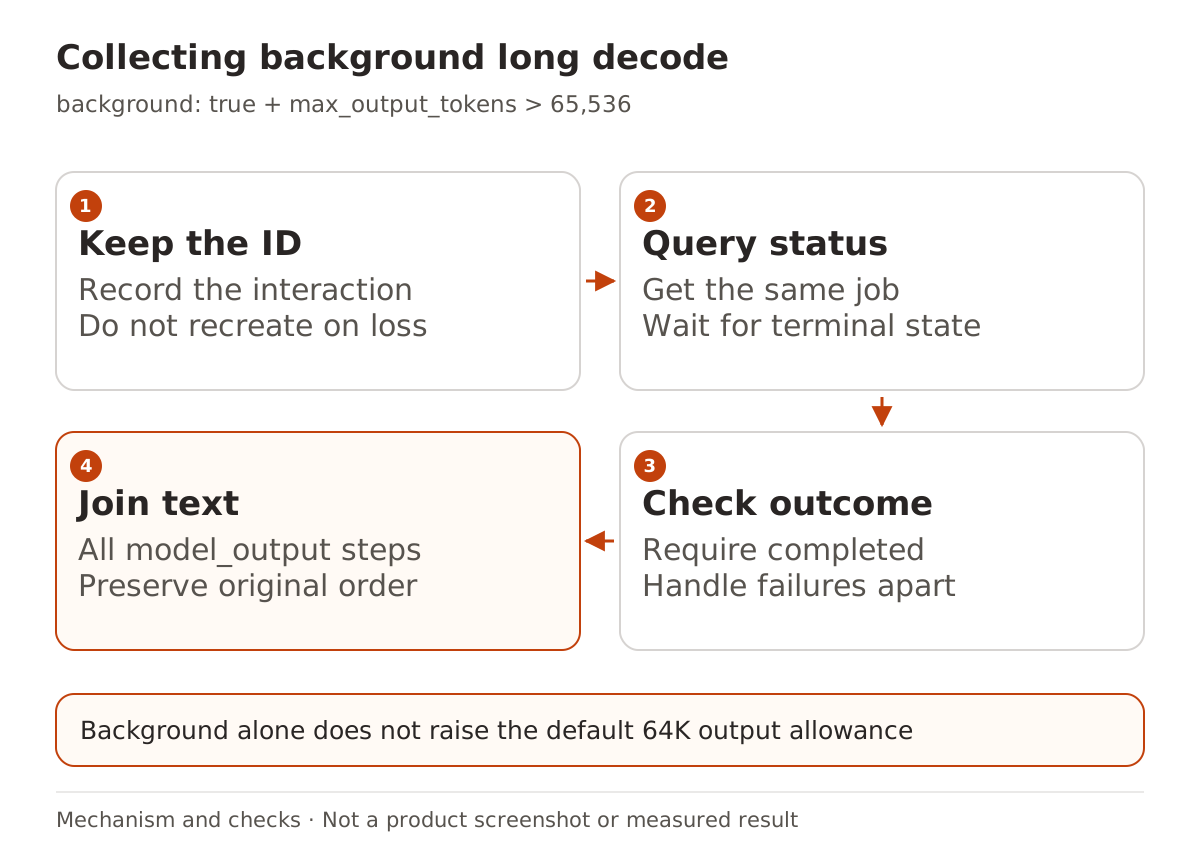
This offline extraction example follows the documented response fields. It makes no API request and is not an authenticated integration test. Save a retrieved response as interaction.json to inspect its status and join its text:
import json
from pathlib import Path

interaction = json.loads(Path("interaction.json").read_text())
if interaction.get("status") != "completed":
    raise SystemExit(f"Not complete: {interaction.get('status')}")

parts = [
    item["text"]
    for step in interaction.get("steps", [])
    if step.get("type") == "model_output"
    for item in step.get("content", [])
    if item.get("type") == "text"
]
if not parts:
    raise SystemExit("No text output")
Path("answer.txt").write_text("".join(parts), encoding="utf-8")
After a connection interruption, query the existing interaction before issuing another creation request. A new POST is not simply more time spent waiting. Check whether your client implements this interaction and continuation protocol; the API format comparison explains why a compatible model endpoint can expose a different surface.
Give a long response a concrete delivery contract
A useful trial is a migration handbook built from public interface documentation. Each chapter can cover one interface, its old fields, replacement behavior, sources, and unresolved questions. Long output may reduce manual chapter assembly, but it cannot replace checking the chapters.
Start with a small collection and an explicit brief:
Write a migration handbook from the three supplied public API documents.
Give each API a chapter covering changes, caller impact, checks, and source links.
Write "not specified" when the source does not establish a behavior.
End with an inventory showing completed APIs and remaining evidence gaps.
As the collection grows, keep its inventory and source ledger. Check chapter coverage, consistent definitions, citations that support each claim, and any executable examples. Capacity does not establish that every source was used correctly. The PDF citation-chain guide offers a related way to inspect evidence flow.
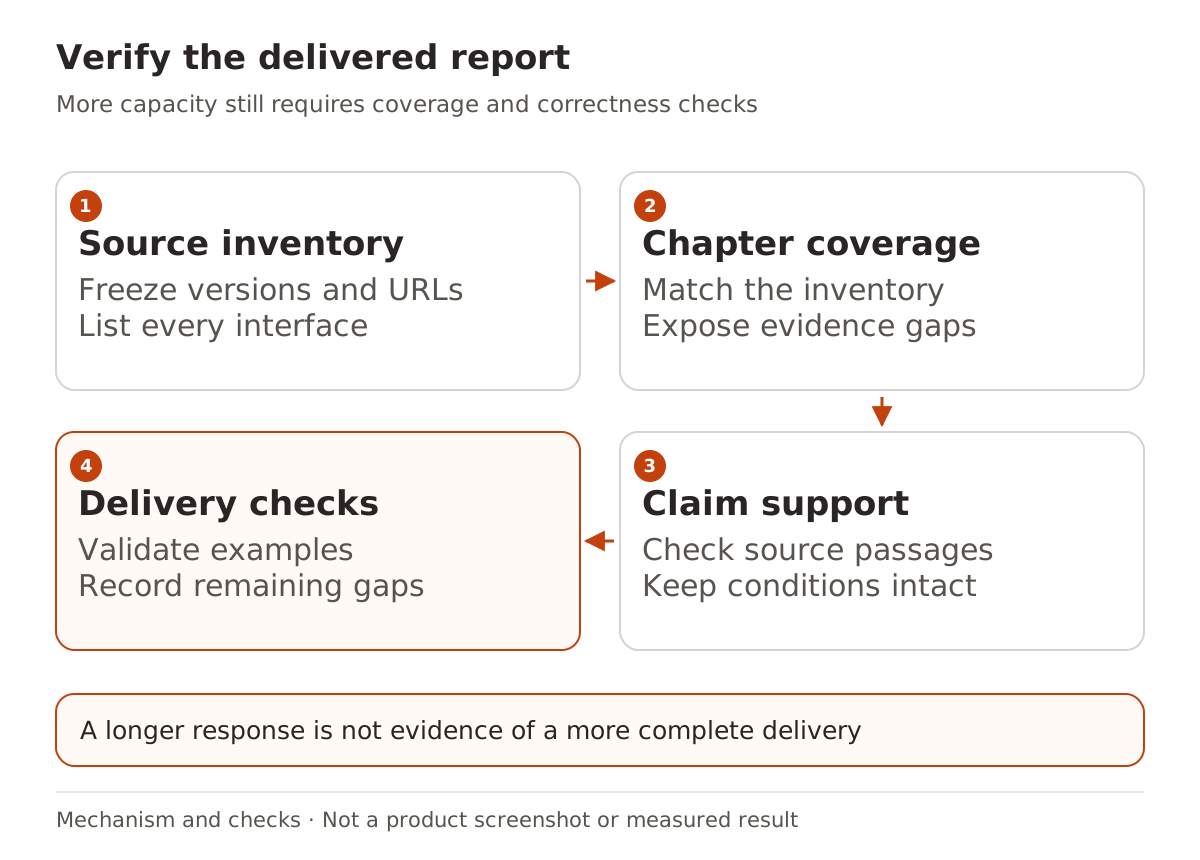
If the work naturally separates into independent short reports, one extremely long generation may add little. Compare complete delivery time, corrections, and usable results before combining the tasks. Output length is not a quality measure.
Check inherited settings before connecting
Argon currently supports implicit caching only. Existing code that creates or references explicit cached_content needs review. The migration guide also says temperature, top_p, and top_k are ignored; remove them so application controls do not imply an effect they no longer have.
The model page lists text, image, video, audio, and PDF input, with text output. Audio input does not imply speech output, and long decode support does not mean every client implements background continuation.
When using Nbility, consult the model ID documentation and the actual catalog available to your key, then verify the required protocol. A model appearing in a compatibility list does not automatically expose Google's native Interactions features. Collect one complete result from small public material before scaling the job.